Data Types
CV-CUDA provides high-performance data type abstractions for computer vision operations.
This guide covers the core data types including Tensors, Images, and their batched variants.
Tensor vs. Image
CV-CUDA provides two primary data types:
Tensor- N-dimensional arrays for generic planar dataImage– 2D data type with color information, support for multi-planar formats, and data layouts
When to Use Each
Tensor
Use a Tensor when:
Generic N-dimensional data - Not specifically image/color data
Non-color information - Feature maps, masks, depth maps
Uniform data layout - All dimensions follow regular striding
ML pipeline integration - Tensors map naturally to ML frameworks like PyTorch
Image
Use an Image when:
Color-correct processing is required - Image carries
Formatmetadata including color space, encoding, and transfer functionsMulti-planar formats - Formats like NV12 have planes with different dimensions (Y plane is full resolution, UV plane is half resolution)
Complex color formats - YUV420, YUV422, raw Bayer patterns, etc.
Note
Why Images exist separately from Tensors:
The Image class provides a more complete abstraction for image data with methods and properties directly related to image operations.
Even when an image could technically be represented as a Tensor, using Image is preferred because it better maps to the underlying domain concept.
The Image class carries the Format along with its data, which allows operators to correctly interpret the image’s color content.
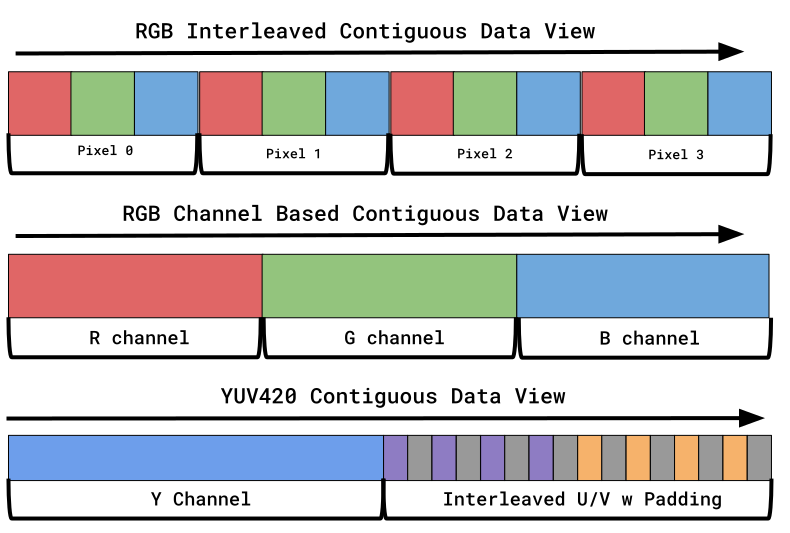
Additionally, some image formats cannot be directly represented as Tensors at all, such as NV12, which has two planes with different dimensions - the Y plane at full resolution and the UV plane at half resolution.
Such multi-planar formats with different plane dimensions are not possible within a single Tensor.
Key Differences
Aspect |
Tensor |
Image |
|---|---|---|
Primary use |
Generic N-D arrays |
Color-correct image processing |
Format metadata |
Just DataType |
Full ImageFormat with color info |
Planes |
N/A (no plane concept) |
Supports multi-planar (different dims per plane) |
Layouts |
N-dimensional strided |
Pitch-linear and block-linear |
Tensor
Overview
A Tensor is an N-dimensional array with a uniform data type and layout.
Tensor is flexible and can represent a wide variety of data types including uniform planar images,
segmentation masks, feature maps, depth maps, and general numerical data.
Properties:
Shape (size of each dimension)
DataType(e.g.,U8,F32)TensorLayout(e.g.,NHWC,NCHW,HWC)Strides (byte offset between elements in each dimension)
Common Tensor Layouts
A TensorLayout describes the semantic meaning of each dimension in a Tensor using dimension labels.
Each label indicates what kind of information that dimension represents (e.g., batch size, height, width, channels).
Standard layouts:
cvcuda.TensorLayout.NHWC- Number of samples, Height, Width, Channels - Batch dimension followed by spatial dimensions with interleaved channelscvcuda.TensorLayout.NCHW- Number of samples, Channels, Height, Width - Batch dimension followed by channels, then spatial dimensions (common in ML frameworks)cvcuda.TensorLayout.HWC- Height, Width, Channels - Single 2D image with packed channels in one planecvcuda.TensorLayout.CHW- Channels, Height, Width - Single 2D multi-planar image where each channel is in its own planecvcuda.TensorLayout.NW- Number of samples, Width - 2D data without spatial dimensions
Standard dimension labels:
A label represents the semantic meaning for a dimension of a tensor. Common labels such as H (height) or W (width) are found, but there are additional common labels:
N- Batch/samplesC- ChannelsH- HeightW- WidthD- Depth (3D spatial dimension)F- Frames (temporal depth for video)
Creating Tensors
import cvcuda
import torch
import numpy as np


def main() -> None:
    # Basic tensor with explicit layout
    tensor1 = cvcuda.Tensor((224, 224, 3), np.uint8, layout="HWC")  # noqa: F841

    # Batch of images
    tensor2 = cvcuda.Tensor((10, 224, 224, 3), np.float32, layout="NHWC")  # noqa: F841

    # For image batch (infers NHWC layout from format)
    tensor3 = cvcuda.Tensor(  # noqa: F841
        nimages=5, imgsize=(640, 480), format=cvcuda.Format.RGB8
    )

    # With row alignment for optimized memory access
    tensor4 = cvcuda.Tensor(  # noqa: F841
        (224, 224, 3), np.uint8, layout="HWC", rowalign=32
    )  # Align rows to 32-byte boundaries

    # Generic N-D tensor
    tensor5 = cvcuda.Tensor((100, 50, 25), np.float32, layout="DHW")  # noqa: F841

    # Wrap existing torch tensor (zero-copy, NHWC)
    torch_tensor = torch.zeros((10, 224, 224, 3), dtype=torch.float32, device="cuda")
    cvcuda_tensor = cvcuda.as_tensor(torch_tensor, layout="NHWC")

    # Common ML layout: NCHW
    torch_nchw = torch.randn((4, 3, 256, 256), dtype=torch.float32, device="cuda")
    cvcuda_nchw = cvcuda.as_tensor(torch_nchw, layout="NCHW")  # noqa: F841

    # Bidirectional: CV-CUDA back to torch (also zero-copy)
    torch_output = torch.as_tensor(cvcuda_tensor.cuda(), device="cuda")  # noqa: F841

    # Video tensor with temporal dimension (Batch, Frames, Height, Width, Channels)
    video_tensor = cvcuda.Tensor(  # noqa: F841
        (2, 30, 720, 1280, 3), np.uint8, layout="NDHWC"
    )
Tensor Documentation
Refer to the following for more information:
TensordocumentationTensorLayoutdocumentationTypedocumentation
Image
Overview
An Image in CV-CUDA is a 2D array of pixels, where each pixel is a unit of visual data composed of one or more color channels that may be stored across one or more planes.
Image includes metadata about how the pixel data should be interpreted.
Properties:
Width and height dimensions
Format- encodes color model, color space, chroma subsampling, memory layout, data type, channel swizzle, and packingCan have multiple planes (e.g., NV12 has 2 planes: Y and UV)
Common Image Formats
Simple RGB/BGR formats:
cvcuda.Format.RGB8- 8-bit RGB interleaved - Red, Green, Blue channels packed together (RGBRGBRGB…) in a single plane, 8 bits per channelcvcuda.Format.RGBA8- 8-bit RGBA interleaved - Red, Green, Blue, Alpha channels packed together (RGBARGBA…) in a single plane, 8 bits per channelcvcuda.Format.BGR8- 8-bit BGR interleaved - Blue, Green, Red channels packed together (BGRBGRBGR…) in a single plane, 8 bits per channel (common in OpenCV)cvcuda.Format.RGB8p- 8-bit RGB planar - Red, Green, Blue channels in separate planes (RRR…GGG…BBB…), 8 bits per channel
Single channel formats:
cvcuda.Format.U8- 8-bit grayscale/single channel - Unsigned 8-bit integer, single planecvcuda.Format.F16- 16-bit float single channel - Half-precision floating point, single plane (halves bandwidth versusF32for mixed-precision pipelines)cvcuda.Format.F32- 32-bit float single channel - 32-bit floating point, single plane (useful for depth maps, feature maps)
YUV formats (video/camera):
cvcuda.Format.NV12- YUV420 semi-planar - 2 planes: full-resolution Y (luma) + half-resolution interleaved UV (chroma). Common in video codecs and camerascvcuda.Format.NV21- YUV420 semi-planar (VU order) - 2 planes: full-resolution Y (luma) + half-resolution interleaved VU (chroma, opposite order from NV12)cvcuda.Format.YUV8p- YUV444 planar - 3 separate full-resolution planes: Y, U, V. No chroma subsamplingcvcuda.Format.YUYV- YUV422 packed - Single plane with horizontally subsampled chroma (YUYV YUYV…)
Creating Images
You can allocate an Image directly using several methods:
import cvcuda
import torch
from nvidia import nvimgcodec


def main() -> None:
    # Direct allocation (managed by CV-CUDA)
    img1 = cvcuda.Image((640, 480), cvcuda.Format.RGB8)  # noqa: F841

    # Zero-initialized
    img2 = cvcuda.Image.zeros((640, 480), cvcuda.Format.RGB8)  # noqa: F841

    # Wrapping GPU buffer (zero-copy)
    gpu_buffer = torch.zeros((480, 640, 3), device="cuda", dtype=torch.uint8)
    img3 = cvcuda.as_image(gpu_buffer, format=cvcuda.Format.RGB8)  # noqa: F841

    # Wrapping multiple GPU buffers (for planar formats)
    gpu_channels = [
        torch.zeros((480, 640), device="cuda", dtype=torch.uint8) for _ in range(3)
    ]
    img4 = cvcuda.as_image(gpu_channels, format=cvcuda.Format.RGB8p)  # noqa: F841

    # With row alignment for optimized memory access
    img6 = cvcuda.Image((1920, 1080), cvcuda.Format.RGB8, rowalign=32)  # noqa: F841

    # Loading images from disk with nvimgcodec - Create decoder
    decoder = nvimgcodec.Decoder()

    # Load image from disk
    image_path = (
        Path(__file__).parent / ".." / "assets" / "images" / "tabby_tiger_cat.jpg"
    )
    nic_img = decoder.read(str(image_path))

    # Convert to CV-CUDA Image
    cvcuda_img = cvcuda.as_image(nic_img, format=cvcuda.Format.RGB8)  # noqa: F841
Image Documentation
Refer to the following for more information:
Converting Between Image and Tensor
Image to Tensor
Image objects can be wrapped as Tensor objects when they meet certain requirements.
See as_tensor for more details.
Requirements for Image → Tensor conversion:
Must be pitch-linear
No chroma subsampling (must be 4:4:4)
All planes must have the same data type and size
Note
Image planes can be discontiguous (independent buffers in memory). Tensor strides can represent this by encoding the address difference between planes as the stride value for the outermost dimension. This allows wrapping discontiguous multi-planar images (e.g., 2-planar formats like planar RGBA) as tensors, provided all planes have identical dimensions and data types.
Example:
def image_to_tensor() -> None:
    """Convert Image to Tensor with zero-copy wrapping."""
    # Valid conversion: pitch-linear format with no chroma subsampling
    image = cvcuda.Image((640, 480), cvcuda.Format.RGB8)
    tensor = cvcuda.as_tensor(image)  # noqa: F841

    # Valid conversion: single channel format
    grayscale = cvcuda.Image((640, 480), cvcuda.Format.U8)
    tensor_gray = cvcuda.as_tensor(grayscale)  # noqa: F841

    # Invalid conversion: NV12 has chroma subsampling
    try:
        nv12 = cvcuda.Image((1920, 1080), cvcuda.Format.NV12)
        tensor_nv12 = cvcuda.as_tensor(nv12)  # noqa: F841
        raise AssertionError("Expected ValueError for NV12 format")
    except RuntimeError as e:
        assert "sub-sampled" in str(e)
Tensor to Image
Tensor objects can be loaded into Image objects, but not directly. In order to do so, you pass the foreign interface accessible via the .cuda() method to the as_image function.
Example:
def tensor_to_image() -> None:
    """Convert Tensor to Image using the foreign interface."""
    # Valid conversion: using the foreign interface (.cuda())
    tensor = cvcuda.Tensor((640, 480, 3), cvcuda.Type.U8, layout="HWC")
    image = cvcuda.as_image(tensor.cuda(), format=cvcuda.Format.RGB8)  # noqa: F841

    # Valid conversion: single channel tensor
    tensor_gray = cvcuda.Tensor((640, 480), cvcuda.Type.U8, layout="HW")
    image_gray = cvcuda.as_image(  # noqa: F841
        tensor_gray.cuda(), format=cvcuda.Format.U8
    )

    # Invalid conversion: passing tensor directly without .cuda()
    try:
        tensor_invalid = cvcuda.Tensor((640, 480, 3), cvcuda.Type.U8, layout="HWC")
        image_invalid = cvcuda.as_image(  # noqa: F841
            tensor_invalid, format=cvcuda.Format.RGB8
        )
        raise AssertionError("Expected TypeError when not using foreign interface")
    except TypeError as e:
        assert "ExternalBuffer" in str(e) or "buffer" in str(e).lower()
Batched Data Types
CV-CUDA provides three container types for batching multiple Image or Tensor together for batch processing.
TensorBatch
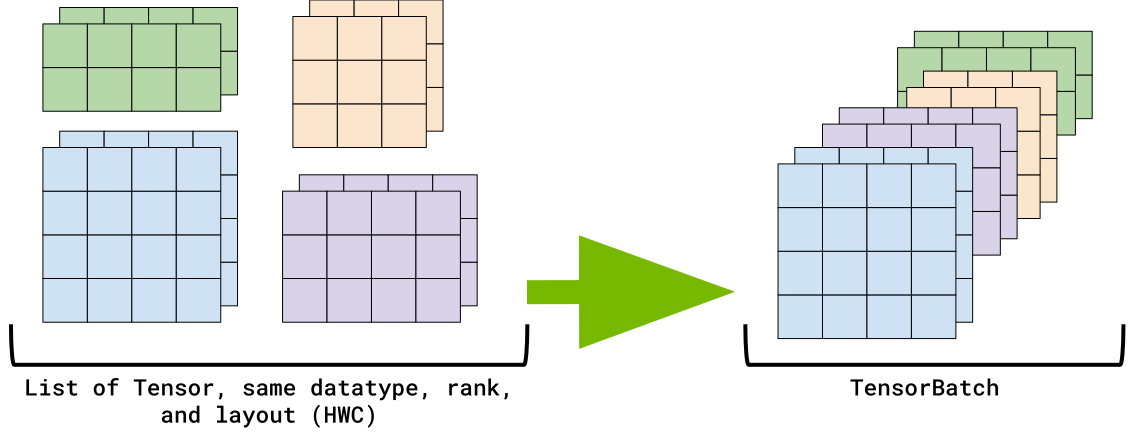
TensorBatch is a container that holds multiple Tensor with varying shapes.
Requirements:
All
Tensors must have the same data typeAll
Tensors must have the same rank (number of dimensions)All
Tensors must have the same layout
Creating TensorBatch
import cvcuda
import numpy as np


def main() -> None:
    # TensorBatch - all tensors must have same rank, dtype, and layout
    batch = cvcuda.TensorBatch(capacity=10)
    tensor1 = cvcuda.Tensor((100, 100, 3), np.uint8, "HWC")
    tensor2 = cvcuda.Tensor((150, 200, 3), np.uint8, "HWC")
    tensor3 = cvcuda.Tensor((200, 150, 3), np.uint8, "HWC")
    batch.pushback([tensor1, tensor2, tensor3])

    # Different datatypes (each batch needs same dtype)
    batch_float = cvcuda.TensorBatch(capacity=5)
    t_float1 = cvcuda.Tensor((100, 100, 3), np.float32, "HWC")
    t_float2 = cvcuda.Tensor((120, 80, 3), np.float32, "HWC")
    batch_float.pushback([t_float1, t_float2])

    batch_int16 = cvcuda.TensorBatch(capacity=5)
    t_int1 = cvcuda.Tensor((50, 50, 1), np.int16, "HWC")
    batch_int16.pushback([t_int1])
ImageBatch
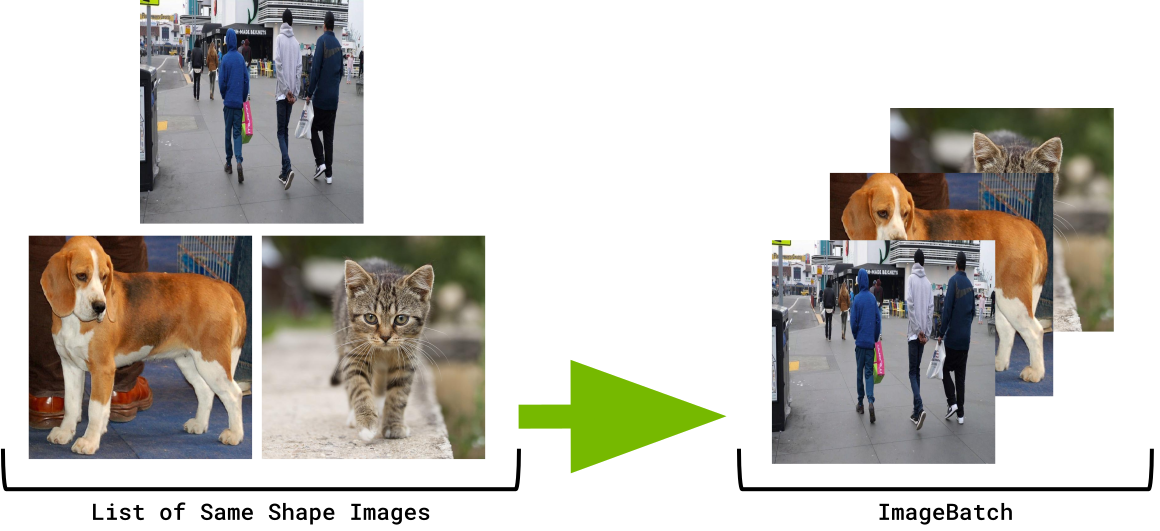
ImageBatch is a container for Images with uniform dimensions and formats.
Requirements:
Creating ImageBatch
import cvcuda

# Python only exports VarShape variant, make an alias
ImageBatch = cvcuda.ImageBatchVarShape


def main() -> None:
    # ImageBatch requires all images to have the same dimensions and format
    batch = ImageBatch(capacity=10)
    img1 = cvcuda.Image((640, 480), cvcuda.Format.RGB8)
    img2 = cvcuda.Image((640, 480), cvcuda.Format.RGB8)
    batch.pushback([img1, img2])

    # Different datatypes - but same dimensions
    batch_rgba = ImageBatch(capacity=5)
    img_rgba = cvcuda.Image((640, 480), cvcuda.Format.RGBA8)  # 4 channels
    batch_rgba.pushback([img_rgba])

    batch_float = ImageBatch(capacity=5)
    img_float = cvcuda.Image((640, 480), cvcuda.Format.RGBf32)  # float32 type
    batch_float.pushback([img_float])
Note
ImageBatch in Python: There is no separate ImageBatch class in the Python API.
For uniform image batches, use either a Tensor with cvcuda.TensorLayout.NHWC layout or ImageBatchVarShape.
The ImageBatchVarShape class handles both uniform image batches (all same size/format) and variable-shape batches (mixed sizes/formats).
ImageBatchVarShape
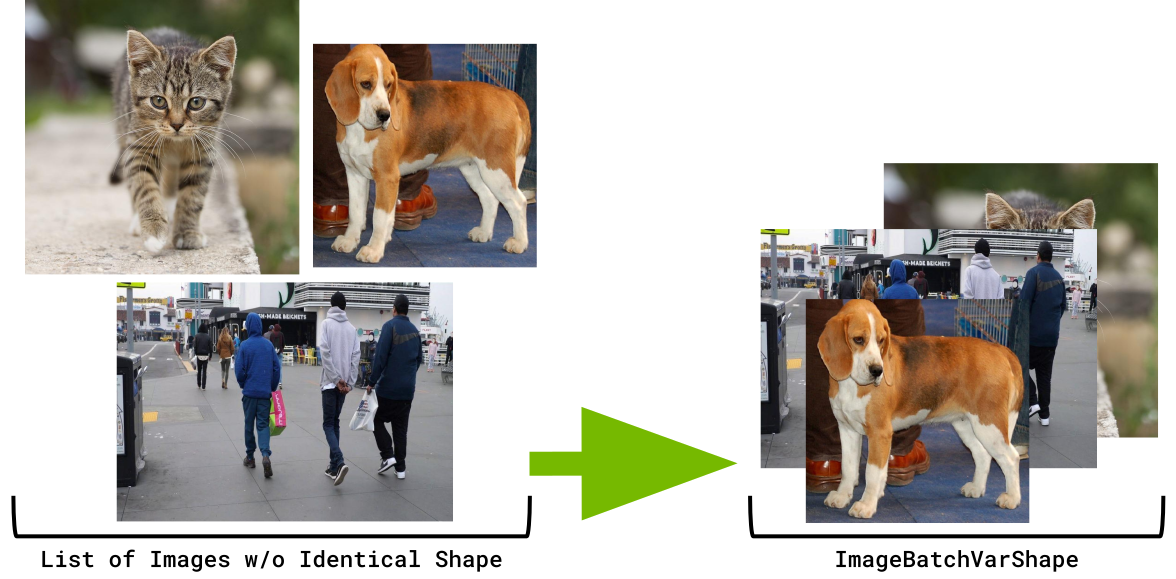
ImageBatchVarShape is a container for Image with variable shapes and formats, providing maximum flexibility.
Requirements:
No requirements - each
Imagecan have different dimensions and formats
Creating ImageBatchVarShape
import cvcuda


def main() -> None:
    # ImageBatchVarShape - can mix different sizes AND formats
    batch = cvcuda.ImageBatchVarShape(capacity=10)
    img1 = cvcuda.Image((640, 480), cvcuda.Format.RGB8)  # uint8, 3 channels
    img2 = cvcuda.Image((1280, 720), cvcuda.Format.RGBA8)  # uint8, 4 channels
    img3 = cvcuda.Image((800, 600), cvcuda.Format.BGR8)  # uint8, 3 channels
    batch.pushback([img1, img2, img3])

    # Can even mix datatypes in same batch
    batch_mixed = cvcuda.ImageBatchVarShape(capacity=5)
    img_uint8 = cvcuda.Image((640, 480), cvcuda.Format.RGB8)  # uint8
    img_float32 = cvcuda.Image((320, 240), cvcuda.Format.RGBf32)  # float32
    img_gray = cvcuda.Image((800, 600), cvcuda.Format.U8)  # grayscale
    batch_mixed.pushback([img_uint8, img_float32, img_gray])
Batch Types Comparison
Feature |
|
||
|---|---|---|---|
Data Type |
|||
Shape Flexibility |
Different shapes (same rank) |
All same size |
Different sizes |
Format Flexibility |
Same dtype/layout |
Same format |
Different formats |
Restrictions |
Same rank, dtype, layout |
Same size, format |
None |
Use Case |
Variable-size feature maps |
Uniform image batches |
Mixed image sizes/formats |
Python API |
Use |
Note
The TensorBatch, ImageBatch and ImageBatchVarShape classes are not interchangeable.