Adaptive Threshold
Overview
The Adaptive Threshold sample demonstrates locally-adaptive binarisation of a grayscale image using
CV-CUDA’s GPU-accelerated adaptive threshold operator. Unlike a global threshold, adaptive
thresholding computes a per-pixel threshold from a local neighbourhood, making it robust to
uneven illumination. The sample converts the colour input to grayscale, runs
cvcuda.adaptivethreshold(), then broadcasts the single-channel result back to RGB for
saving as a viewable JPEG.
Usage
Basic Usage
Apply adaptive thresholding to the default cat image:
python3 adaptivethreshold.py
Custom Input
Supply your own image and output path:
python3 adaptivethreshold.py -i input.jpg -o cat_adaptivethreshold.jpg
Command-Line Arguments
Argument |
Short Form |
Default |
Description |
|---|---|---|---|
|
|
tabby_tiger_cat.jpg |
Input image file path |
|
|
cvcuda/.cache/cat_adaptivethreshold.jpg |
Output image file path |
Implementation
Adaptive Threshold Operation
# adaptivethreshold requires a single-channel (grayscale) U8 input.
# Stack the HWC image into a batch (NHWC) so cvtcolor can operate on it,
# then convert RGB to grayscale.
nhwc_image: cvcuda.Tensor = cvcuda.stack([input_image])
gray_nhwc: cvcuda.Tensor = cvcuda.cvtcolor(
    nhwc_image, cvcuda.ColorConversion.RGB2GRAY
)
Key points:
Single-channel input:
cvcuda.adaptivethreshold()requires a U8 single-channel (HWC with C=1 or NHWC with C=1) tensor; colour images must be converted to grayscale first.Adaptive method:
GAUSSIAN_Cuses a Gaussian-weighted neighbourhood average;MEAN_Cuses a plain mean — both then subtract the constantcto produce the local threshold.block_size: Must be an odd integer ≥ 3; larger values consider a wider neighbourhood and produce smoother thresholds.
c constant: A positive
cmakes the threshold stricter (fewer pixels exceed it), producing a sparser binary result; negative values do the opposite.Viewable output: The single-channel binary result is replicated to three channels on the host before writing so that standard JPEG viewers can display it correctly.
Expected Output
The output is a binary (black-and-white) image where pixel intensity reflects whether each pixel exceeded its local Gaussian-weighted neighbourhood threshold:

Original Input Image |
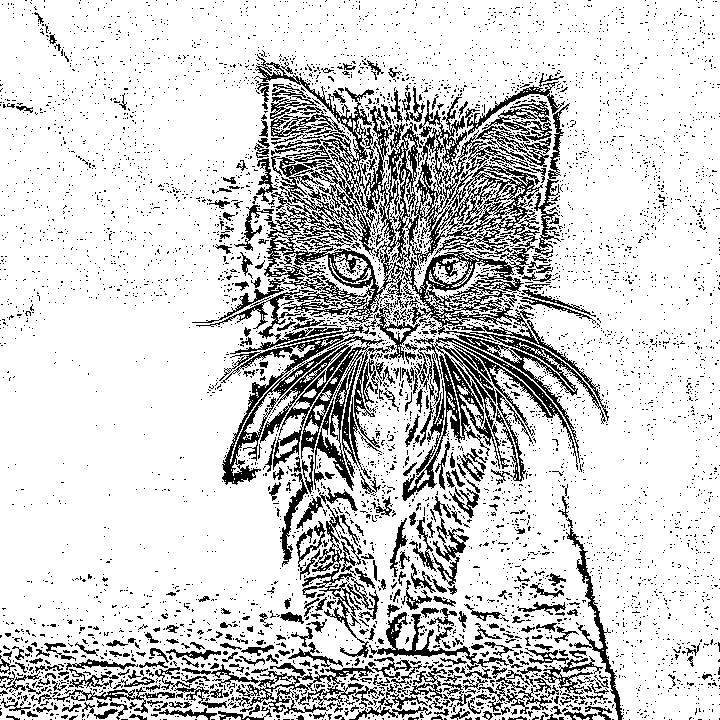
Output: Adaptive Threshold (GAUSSIAN_C, block=11, c=2) |
CV-CUDA Operators Used
Operator |
Purpose |
|---|---|
Convert RGB input to single-channel grayscale |
|
Apply locally-adaptive binarisation per pixel |
Common Utilities Used
read_image() - Load input image as CV-CUDA tensor
write_image() - Save thresholded result as JPEG
cuda_memcpy_d2h/cuda_memcpy_h2d- Transfer binary result to host for channel replication, then back to device
See Also
Resize Operator - Basic image transformation
Common Utilities - Helper functions