Erase
Overview
The Erase sample demonstrates how to fill one or more rectangular regions of an image with solid colours using CV-CUDA’s GPU-accelerated erase operator. Six rectangular regions (red, green, blue, white, and black solid fills plus one green-channel-only tint) are stamped onto the image entirely on the GPU — no round-trip to the CPU is needed for the pixel data.
Usage
Basic Usage
Erase six rectangular regions into the default tabby-cat image:
python3 erase.py -i input.jpg
Custom Output Path
Save the result to a specific file:
python3 erase.py -i input.jpg -o erased.jpg
Command-Line Arguments
Argument |
Short Form |
Default |
Description |
|---|---|---|---|
|
|
tabby_tiger_cat.jpg |
Input image file path |
|
|
cvcuda/.cache/cat_erase.jpg |
Output image file path |
Implementation
Parameter Tensor Setup
# The erase operator works on a batched NHWC tensor, so wrap the HWC image
# in a batch dimension of size 1.
height, width, channels = input_image.shape
nhwc_image: cvcuda.Tensor = input_image.reshape(
    (1, height, width, channels), "NHWC"
)

# Number of rectangular regions to erase.
num_areas = 6

# anchor: (x, y) pixel coordinates of the top-left corner of each rectangle.
# Shape (num_areas,) with element type _2S32 (pair of int32).
anchor_host = np.array(
    [[50, 80], [200, 150], [350, 300], [480, 80], [480, 260], [200, 400]],
    dtype=np.int32,
)
anchor = cvcuda.Tensor((num_areas,), cvcuda.Type._2S32, "N")
cuda_memcpy_h2d(anchor_host, anchor.cuda())

# erasing: (width, height, flag) for each rectangle.
# flag is a channel bitmask: bit0=R, bit1=G, bit2=B.
# 7 (0b111) erases all three channels (solid fill).
# 2 (0b010) erases only the green channel, leaving R and B intact — tint.
erasing_host = np.array(
    [
        [120, 80, 7],
        [160, 100, 7],
        [100, 120, 7],
        [120, 100, 7],
        [120, 100, 7],
        [160, 100, 2],
    ],
    dtype=np.int32,
)
erasing = cvcuda.Tensor((num_areas,), cvcuda.Type._3S32, "N")
cuda_memcpy_h2d(erasing_host, erasing.cuda())

# values: 4 float32 fill values per area (R,G,B,A), laid out flat.
# The operator always reserves 4 slots regardless of channel count.
values_host = np.array(
    [
        255.0,
        0.0,
        0.0,
        0.0,  # area 0: red   (solid, flag=7)
        0.0,
        255.0,
        0.0,
        0.0,  # area 1: green (solid, flag=7)
        0.0,
        0.0,
        255.0,
        0.0,  # area 2: blue  (solid, flag=7)
        255.0,
        255.0,
        255.0,
        0.0,  # area 3: white (solid, flag=7)
        0.0,
        0.0,
        0.0,
        0.0,  # area 4: black (solid, flag=7)
        0.0,
        255.0,
        0.0,
        0.0,  # area 5: green tint (G channel only, flag=2)
    ],
    dtype=np.float32,
)
values = cvcuda.Tensor((num_areas * 4,), cvcuda.Type.F32, "N")
cuda_memcpy_h2d(values_host, values.cuda())

# imgIdx: which image in the batch each rectangle belongs to.
# All areas are applied to image index 0.
imgIdx_host = np.array([0, 0, 0, 0, 0, 0], dtype=np.int32)
imgIdx = cvcuda.Tensor((num_areas,), cvcuda.Type.S32, "N")
cuda_memcpy_h2d(imgIdx_host, imgIdx.cuda())
Erase Call
# The erase operator works on a batched NHWC tensor, so wrap the HWC image
# in a batch dimension of size 1.
height, width, channels = input_image.shape
nhwc_image: cvcuda.Tensor = input_image.reshape(
    (1, height, width, channels), "NHWC"
)

# Number of rectangular regions to erase.
num_areas = 6

# anchor: (x, y) pixel coordinates of the top-left corner of each rectangle.
# Shape (num_areas,) with element type _2S32 (pair of int32).
anchor_host = np.array(
    [[50, 80], [200, 150], [350, 300], [480, 80], [480, 260], [200, 400]],
    dtype=np.int32,
)
anchor = cvcuda.Tensor((num_areas,), cvcuda.Type._2S32, "N")
cuda_memcpy_h2d(anchor_host, anchor.cuda())

# erasing: (width, height, flag) for each rectangle.
# flag is a channel bitmask: bit0=R, bit1=G, bit2=B.
# 7 (0b111) erases all three channels (solid fill).
# 2 (0b010) erases only the green channel, leaving R and B intact — tint.
erasing_host = np.array(
    [
        [120, 80, 7],
        [160, 100, 7],
        [100, 120, 7],
        [120, 100, 7],
        [120, 100, 7],
        [160, 100, 2],
    ],
    dtype=np.int32,
)
erasing = cvcuda.Tensor((num_areas,), cvcuda.Type._3S32, "N")
cuda_memcpy_h2d(erasing_host, erasing.cuda())

# values: 4 float32 fill values per area (R,G,B,A), laid out flat.
# The operator always reserves 4 slots regardless of channel count.
values_host = np.array(
    [
        255.0,
        0.0,
        0.0,
        0.0,  # area 0: red   (solid, flag=7)
        0.0,
        255.0,
        0.0,
        0.0,  # area 1: green (solid, flag=7)
        0.0,
        0.0,
        255.0,
        0.0,  # area 2: blue  (solid, flag=7)
        255.0,
        255.0,
        255.0,
        0.0,  # area 3: white (solid, flag=7)
        0.0,
        0.0,
        0.0,
        0.0,  # area 4: black (solid, flag=7)
        0.0,
        255.0,
        0.0,
        0.0,  # area 5: green tint (G channel only, flag=2)
    ],
    dtype=np.float32,
)
values = cvcuda.Tensor((num_areas * 4,), cvcuda.Type.F32, "N")
cuda_memcpy_h2d(values_host, values.cuda())

# imgIdx: which image in the batch each rectangle belongs to.
# All areas are applied to image index 0.
imgIdx_host = np.array([0, 0, 0, 0, 0, 0], dtype=np.int32)
imgIdx = cvcuda.Tensor((num_areas,), cvcuda.Type.S32, "N")
cuda_memcpy_h2d(imgIdx_host, imgIdx.cuda())
Key points:
Parameter tensors:
anchor,erasing,values, andimgIdxare small 1-D tensors built from NumPy arrays and uploaded to the GPU withcuda_memcpy_h2d.Batch dimension: The operator expects NHWC input, so a single HWC image is wrapped in a batch of size 1 via
reshape.anchor holds
(x, y)pixel coordinates of each rectangle’s top-left corner (type_2S32— a pair of int32 per element).erasing holds
(width, height, flag)per rectangle;flagis a channel bitmask (bit0=R, bit1=G, bit2=B) selecting which channels are overwritten by thevaluesfill.flag=7(0b111) replaces all three channels for a solid fill, whileflag=2(0b010) replaces only the green channel, leaving R and B intact for a tint.random mode: Setting
random=Trueignoresvaluesand fills each rectangle with deterministic pseudo-random noise controlled byseed.
Expected Output
The output image is identical to the input except for six erased regions — red, green, blue, white, and black solid rectangles plus one green-channel-only tint:

Original Input Image |
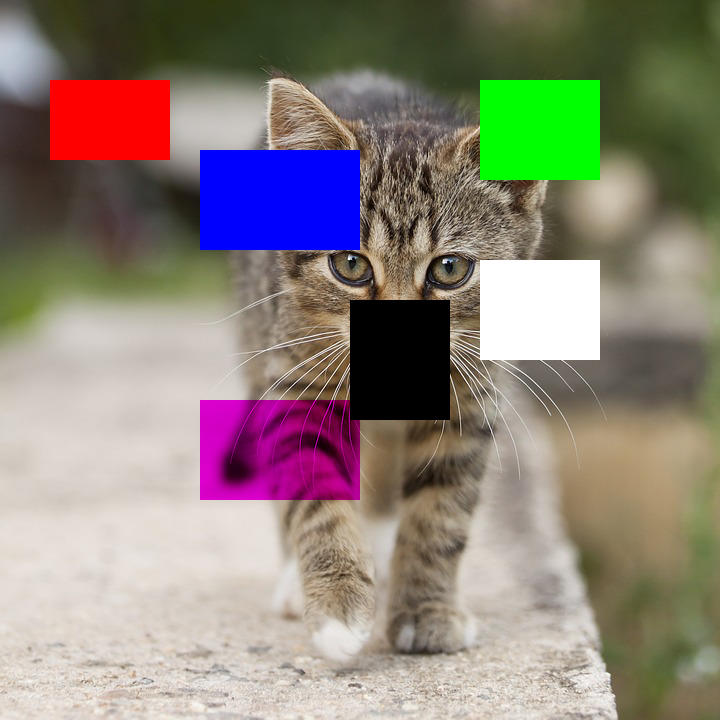
Output: Six rectangular regions erased from the image |
CV-CUDA Operators Used
Operator |
Purpose |
|---|---|
Fill rectangular regions with solid colours or pseudo-random noise |
Common Utilities Used
read_image() - Load image as CV-CUDA tensor
write_image() - Save erased image
cuda_memcpy_h2d- Upload NumPy parameter arrays to the GPU
See Also
Resize Operator - Basic single-operator sample structure
Common Utilities - Helper functions