Laplacian
Overview
The Laplacian sample demonstrates second-order edge detection using CV-CUDA’s GPU-accelerated Laplacian operator. The Laplacian highlights regions of rapid intensity change, making it a classic tool for detecting edges and fine structures in images. After applying the operator the sample stretches the response histogram to the full uint8 range so the edge map is immediately viewable as a JPEG.
Usage
Basic Usage
Apply the Laplacian operator with the default settings (ksize=3, scale=1.0):
python3 laplacian.py -i input.jpg
Custom Output Path
Specify a custom output file path:
python3 laplacian.py -i input.jpg -o cat_laplacian.jpg
Command-Line Arguments
Argument |
Short Form |
Default |
Description |
|---|---|---|---|
|
|
tabby_tiger_cat.jpg |
Input image file path |
|
|
cvcuda/.cache/cat_laplacian.jpg |
Output image file path |
Implementation
Laplacian Edge Detection
# Apply the Laplacian operator.
# ksize=3 selects the 3×3 discrete Laplacian aperture; scale=1.0 leaves
# the computed values unchanged before the output is saturated back to uint8.
# REPLICATE border avoids zero-valued artifacts at the image boundary.
output_image: cvcuda.Tensor = cvcuda.laplacian(
    input_image,
    ksize=3,
    scale=1.0,
    border=cvcuda.Border.REPLICATE,
)

# The raw Laplacian response occupies only a small fraction of [0, 255].
# Stretch the histogram so the edges are clearly visible in the saved JPEG.
output_image = normalize_to_uint8(output_image)

write_image(output_image, args.output)
Key points:
Kernel size:
ksize=3selects the 3×3 discrete Laplacian aperture. The only other supported value isksize=1, which uses a simpler cross-shaped kernel.Scale factor:
scale=1.0applies a uniform multiplier to the computed Laplacian values before the result is saturated back to the input dtype. Increasing the scale amplifies weaker edges.Border handling:
cvcuda.Border.REPLICATErepeats the edge pixels outward, avoiding the zero-filled boundary artifacts thatCONSTANTmode would introduce.Dtype preservation: The operator returns a tensor with the same dtype and layout as the input (uint8 HWC here), so no format conversion is required.
Histogram stretching: The raw Laplacian response is typically concentrated in a narrow value range. A host-side min/max stretch makes the edge map clearly visible in the saved image without changing the operator’s output semantics.
Expected Output
The output shows the Laplacian edge response of the input image, normalized for visibility:

Original Input Image |
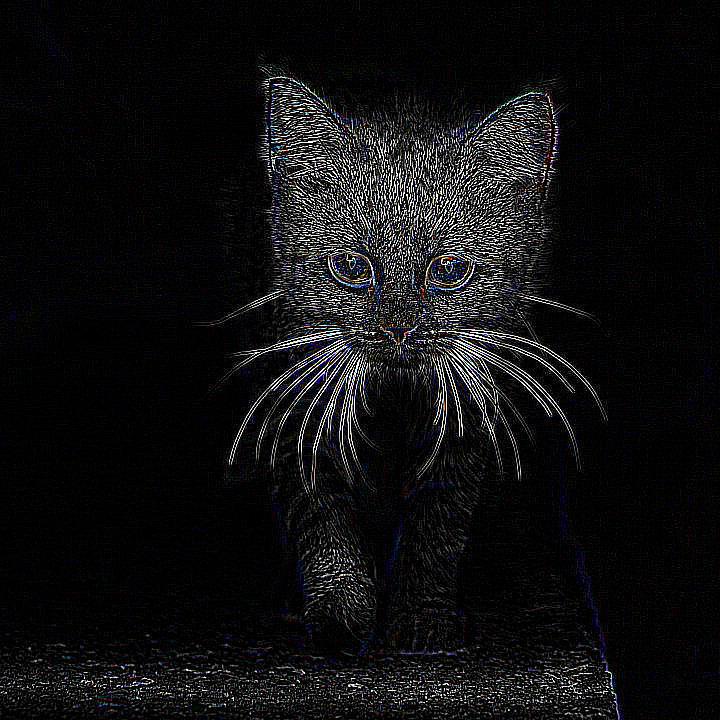
Output: Laplacian Edge Response |
CV-CUDA Operators Used
Operator |
Purpose |
|---|---|
Apply second-order Laplacian edge-detection filter to the input image |
Common Utilities Used
read_image() - Load image as CV-CUDA tensor
write_image() - Save the edge-response image
cuda_memcpy_d2h/cuda_memcpy_h2d- Transfer tensor data to/from host for histogram stretching
See Also
Resize Operator - Resize images with GPU acceleration
Common Utilities - Helper functions used across samples