Inpaint
Overview
The Inpaint sample demonstrates image inpainting using CV-CUDA’s GPU-accelerated inpaint operator. Inpainting reconstructs the pixel values inside a user-supplied mask region by propagating colour information from the surrounding unmasked pixels. The sample simulates salt-and-pepper sensor noise by randomly zeroing ~15 % of pixels, then uses inpainting to remove the noise and restore the image.
Usage
Basic Usage
Inpaint the default tabby-cat image:
python3 inpaint.py -i input.jpg
Custom Input and Output
Specify a custom input image and output path:
python3 inpaint.py -i image.jpg -o cat_inpaint.jpg
Command-Line Arguments
Argument |
Short Form |
Default |
Description |
|---|---|---|---|
|
|
tabby_tiger_cat.jpg |
Input image file path |
|
|
cvcuda/.cache/cat_inpaint.jpg |
Output image file path |
Implementation
Inpainting and Outside-Mask Restoration
# Reshape to NHWC and download so we can synthesise the damage on the CPU.
# We keep a clean copy of the original to restore non-masked pixels later.
nhwc_image: cvcuda.Tensor = input_image.reshape((1, height, width, 3), "NHWC")
orig_np = download_tensor(input_image)  # (H, W, 3)
damaged_np = orig_np.copy()[np.newaxis]  # (1,H,W,3)

# Simulate salt-and-pepper sensor noise by randomly zeroing ~15% of pixels.
# Each masked pixel is surrounded by unmasked neighbours so the inpaint
# operator fills every corrupted pixel cleanly from its immediate context.
rng = np.random.default_rng(42)
noise_mask = rng.random((height, width)) < 0.15  # bool (H, W)
mask_np = np.zeros((1, height, width, 1), dtype=np.uint8)
mask_np[0, :, :, 0] = noise_mask.astype(np.uint8) * 255
damaged_np[0, noise_mask, :] = 0

# Save the noisy image for the before/after comparison in the docs.
damaged_output = args.output.parent / (
    args.output.stem + "_damaged" + args.output.suffix
)
upload_tensor(np.ascontiguousarray(damaged_np), nhwc_image)
write_image(nhwc_image.reshape((height, width, 3), "HWC"), damaged_output)

# Re-upload damaged (write_image may have altered the tensor content)
upload_tensor(np.ascontiguousarray(damaged_np), nhwc_image)

mask_tensor: cvcuda.Tensor = cvcuda.Tensor(
    (1, height, width, 1), cvcuda.Type.U8, "NHWC"
)
upload_tensor(mask_np, mask_tensor)
Key points:
Mask format: The mask must be a single-channel (
NHWCwithC=1)U8tensor. Non-zero pixels mark the region to be reconstructed; zero pixels are left unchanged.Batched input:
cvcuda.inpaintrequires anNHWC(batched) source tensor. A plainHWCimage is reshaped to(1, H, W, C)before the call.inpaintRadius: Controls the neighbourhood radius examined when reconstructing each masked pixel. Larger values smooth over wider damaged areas at the cost of more computation.
Outside-mask restoration: The operator may alter pixels just outside the mask boundary, so the result is downloaded and the original content is restored everywhere outside the mask (via
np.where) before the final image is uploaded and saved.Synthetic mask via upload_tensor: The mask is built as a NumPy array on the CPU and then uploaded to a pre-allocated GPU tensor with
upload_tensor, matching the pattern used whenever host-side parameter data must be passed as a tensor.
Expected Output
The output shows the image with salt-and-pepper noise removed by inpainting:
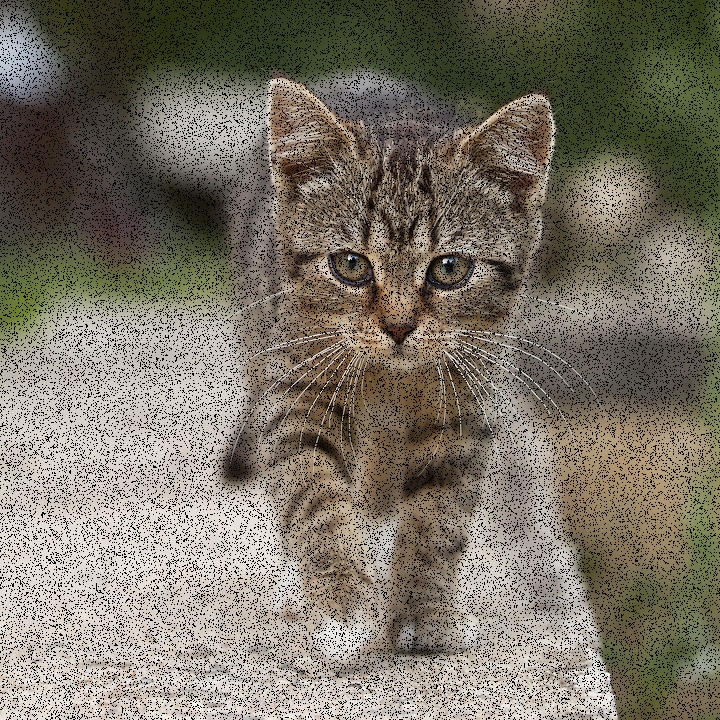
Input: Image with simulated salt-and-pepper sensor noise (~15 % pixels zeroed) |
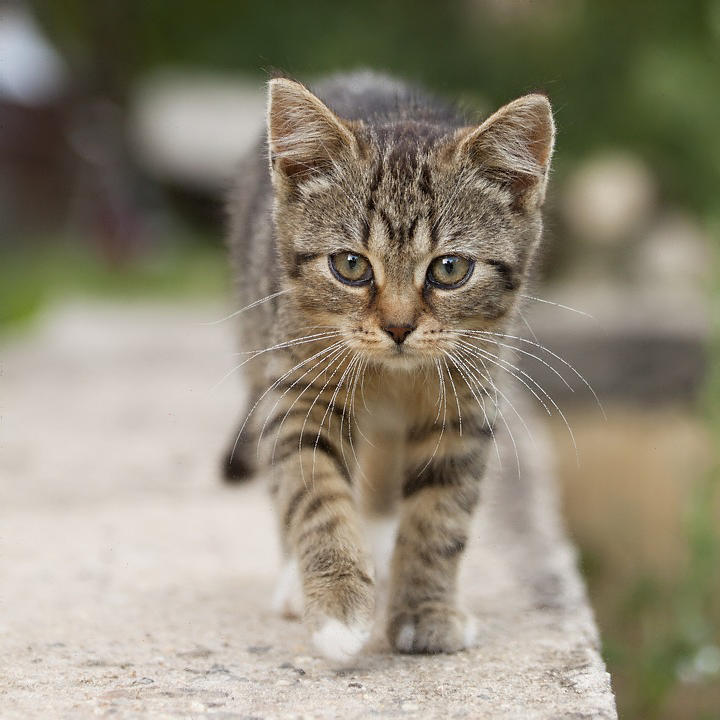
Output: Noise removed by inpainting |
CV-CUDA Operators Used
Operator |
Purpose |
|---|---|
Reconstruct masked pixel regions using surrounding colour information |
Common Utilities Used
read_image() - Load image as CV-CUDA tensor
write_image() - Save inpainted image
upload_tensor- Upload the CPU-built mask and result arrays to GPU tensorsdownload_tensor- Download tensors to the CPU for damage synthesis and restoration
See Also
Resize Operator - Simple single-operator sample
Label Operator - Another sample that synthesises inputs and uploads via cuda_memcpy_h2d
Common Utilities - Helper functions