Random Resized Crop
Overview
The Random Resized Crop sample demonstrates how to use CV-CUDA’s GPU-accelerated
cvcuda.random_resized_crop() operator to randomly select a sub-region of an
image, resize it to a fixed output size, and write the result. This operation is the
core augmentation used in standard ImageNet training pipelines (e.g., torchvision’s
RandomResizedCrop): a crop whose area is a random fraction of the original image
area and whose aspect ratio is sampled from a configurable range.
Usage
Basic Usage
Apply random resized crop with default 224×224 output:
python3 random_resized_crop.py -i input.jpg
Custom Output Size
Specify a different target resolution:
python3 random_resized_crop.py -i input.jpg -o cropped.jpg --width 320 --height 320
Command-Line Arguments
Argument |
Short Form |
Default |
Description |
|---|---|---|---|
|
|
tabby_tiger_cat.jpg |
Input image file path |
|
|
cvcuda/.cache/cat_random_resized_crop.jpg |
Output image file path |
|
224 |
Target output width in pixels |
|
|
224 |
Target output height in pixels |
Implementation
Random Resized Crop
# The operator works on batched (NHWC) tensors, so wrap the single HWC image
# in a batch dimension of size 1. The output shape must also carry the batch dim.
batched_input: cvcuda.Tensor = input_image.reshape((1, *input_image.shape), "NHWC")
_, _, _, c = batched_input.shape
output_h, output_w = args.height, args.width
output_shape = (1, output_h, output_w, c)

# Scale bounds control what fraction of the original image area the crop covers.
# A min_scale of 0.08 and max_scale of 1.0 matches the standard torchvision
# RandomResizedCrop defaults used in ImageNet training pipelines.
min_scale: float = 0.08
max_scale: float = 1.0

# Ratio bounds set the aspect-ratio range (width/height) for the crop window
# before it is resized to the target output dimensions.
min_ratio: float = 0.75
max_ratio: float = 1.3333333
seed: int = 42
Key points:
Batched NHWC input: The operator expects an NHWC tensor (batch dimension first). A single HWC image is reshaped to
(1, H, W, C)before the call and the result is reshaped back to(H, W, C)afterwards.Scale bounds:
min_scaleandmax_scalecontrol what fraction of the original image area the random crop covers. The defaults(0.08, 1.0)match standard ImageNet pre-processing.Ratio bounds:
min_ratioandmax_ratiobound the width-to-height ratio of the crop region before it is scaled to the output size, letting the network see both tall and wide crops.Interpolation:
cvcuda.Interp.LINEAR(bilinear) gives a good quality/speed trade-off;NEARESTis faster,CUBICprovides higher fidelity.Reproducibility: The
seedparameter makes the crop deterministic, which is useful for debugging or ablation experiments.
Expected Output
The output shows a randomly selected and resized crop of the original image:

Original Input Image |
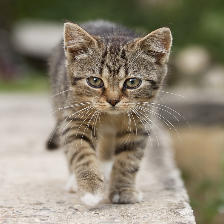
Output: Random Resized Crop to 224×224 |
CV-CUDA Operators Used
Operator |
Purpose |
|---|---|
Randomly crop a sub-region of the image and resize it to the target dimensions |
Common Utilities Used
read_image() - Load image as CV-CUDA tensor
write_image() - Save the cropped and resized image
See Also
Resize Operator - Deterministic resize to fixed dimensions
Common Utilities - Helper functions