Center Crop
Overview
The Center Crop sample demonstrates symmetric center-cropping of an image using
CV-CUDA’s GPU-accelerated center_crop operator. The operator extracts a
rectangular region from the geometric centre of the image without requiring the
caller to compute corner offsets manually.
Usage
Basic Usage
Crop the default cat image to 224×224 pixels:
python3 center_crop.py -i input.jpg
Custom Crop Size
Specify a different crop width and height:
python3 center_crop.py -i input.jpg -o cat_center_crop.jpg --width 320 --height 240
Command-Line Arguments
Argument |
Short Form |
Default |
Description |
|---|---|---|---|
|
|
tabby_tiger_cat.jpg |
Input image file path |
|
|
cvcuda/.cache/cat_center_crop.jpg |
Output image file path |
|
224 |
Crop width in pixels (clamped to input width) |
|
|
224 |
Crop height in pixels (clamped to input height) |
Implementation
Center Crop
# Derive a square crop size that fits within the image dimensions.
# The operator requires [crop_height, crop_width] as a Python list.
h, w = input_image.shape[0], input_image.shape[1]
crop_h = min(args.height, h)
crop_w = min(args.width, w)
crop_size = [crop_h, crop_w]
Key points:
No coordinate math:
cvcuda.center_cropcomputes the top-left corner internally, so the caller only needs to supply the desired[height, width].crop_size list: The second argument is a two-element Python list
[crop_height, crop_width]— not a tuple.Layout preserved: The output tensor shares the same layout (HWC/NHWC) and dtype as the input; no conversion is needed before writing.
Clamping: The sample clamps the requested crop dimensions to the actual image size to avoid an out-of-bounds error when the crop is larger than the source.
Single-image usage: The sample operates on an HWC tensor directly; batched NHWC usage follows the same
crop_sizeargument convention.
Expected Output
The output is the center portion of the input image at the requested dimensions (default 224×224):

Original Input Image |
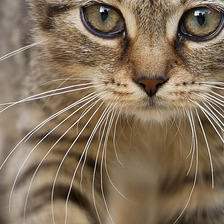
Output: Center-cropped to 224×224 |
CV-CUDA Operators Used
Operator |
Purpose |
|---|---|
Symmetrically crop a rectangular region from the centre of an image |
Common Utilities Used
read_image() - Load image as CV-CUDA tensor
write_image() - Save cropped image
See Also
Resize Operator - Scale images to arbitrary dimensions
Common Utilities - Helper functions used across samples