Threshold
Overview
The Threshold sample demonstrates pixel-level intensity thresholding using CV-CUDA’s GPU-accelerated threshold operator. A binary threshold is applied: every pixel whose value exceeds a configurable threshold is set to a maximum value (255), and all others are set to 0, producing a clean binary mask.
Usage
Basic Usage
Apply a binary threshold to an image (default threshold = 128):
python3 threshold.py -i input.jpg
Custom Output Path
Specify a custom output file:
python3 threshold.py -i input.jpg -o thresholded.jpg
Command-Line Arguments
Argument |
Short Form |
Default |
Description |
|---|---|---|---|
|
|
tabby_tiger_cat.jpg |
Input image file path |
|
|
cvcuda/.cache/cat_threshold.jpg |
Output image file path |
Implementation
Threshold Operator
# threshold() requires a batch dimension (NHWC), so wrap the HWC image.
# One thresh/maxval scalar is needed per image in the batch.
nhwc_image: cvcuda.Tensor = input_image.reshape((1, *input_image.shape), "NHWC")
batch_size = nhwc_image.shape[0]

# Allocate per-image threshold and maxval tensors on the GPU (dtype F64, layout "N").
thresh_host = np.array([128.0] * batch_size, dtype=np.float64)
thresh_tensor = cvcuda.Tensor((batch_size,), dtype=np.float64, layout="N")
cuda_memcpy_h2d(thresh_host, thresh_tensor.cuda())

maxval_host = np.array([255.0] * batch_size, dtype=np.float64)
maxval_tensor = cvcuda.Tensor((batch_size,), dtype=np.float64, layout="N")
cuda_memcpy_h2d(maxval_host, maxval_tensor.cuda())
Key points:
Batch dimension required:
cvcuda.thresholdexpects NHWC layout, so a HWC image must be reshaped with a leading batch dimension before calling the operator.Per-image parameters:
threshandmaxvalare GPU tensors of shape(N,)and dtypeF64, allowing each image in a batch to use a different threshold value.Upload via cuda_memcpy_h2d: NumPy arrays holding the scalar parameters are copied to GPU memory using
cuda_memcpy_h2dbefore the operator is called.BINARY type:
cvcuda.ThresholdType.BINARYsets pixels above the threshold tomaxvaland all others to zero; other types (BINARY_INV,TRUNC,TOZERO,TOZERO_INV,OTSU,TRIANGLE) are also available.Output shape preserved: The operator returns a tensor with the same shape, layout, and dtype as the input, which is reshaped back to HWC before writing.
Expected Output
The output is a binary image where bright regions (pixel value > 128) appear white and dark regions appear black:

Original Input Image |
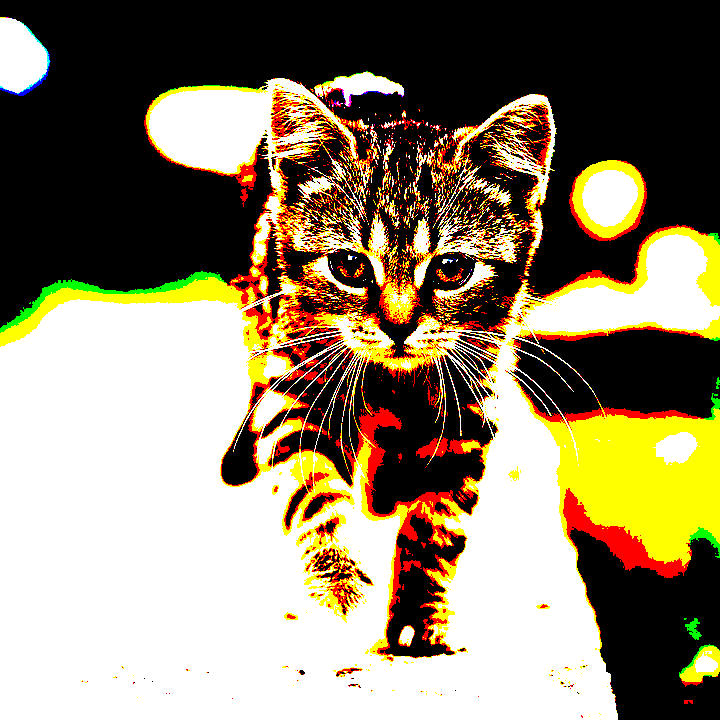
Output: Binary Threshold (thresh=128, maxval=255) |
CV-CUDA Operators Used
Operator |
Purpose |
|---|---|
Apply pixel-intensity thresholding with configurable per-image threshold and maxval |
Common Utilities Used
read_image() - Load image as CV-CUDA tensor
write_image() - Save thresholded image
cuda_memcpy_h2d- Upload per-image threshold and maxval scalars to GPU memory
See Also
Resize Operator - Basic GPU image resize
Label Operator - Connected-components labeling using threshold as preprocessing
Common Utilities - Helper functions