HQ Resize
Overview
The HQ Resize sample demonstrates high-quality image resizing using CV-CUDA’s GPU-accelerated HQ
Resize operator. Unlike the standard Resize operator, HQ Resize accepts separate interpolation
filters for downscaling (min_interpolation) and upscaling (mag_interpolation), and
optionally applies an antialiasing low-pass filter before downscaling to eliminate moiré patterns
and ringing artifacts.
Usage
Basic Usage
HQ-resize an image to 224×224 (default):
python3 hq_resize.py -i input.jpg
Custom Dimensions
Specify a target width and height with a custom output path:
python3 hq_resize.py -i input.jpg -o cat_hq_resize.jpg --width 512 --height 512
Command-Line Arguments
Argument |
Short Form |
Default |
Description |
|---|---|---|---|
|
|
tabby_tiger_cat.jpg |
Input image file path |
|
|
cvcuda/.cache/cat_hq_resize.jpg |
Output image file path |
|
224 |
Target width in pixels |
|
|
224 |
Target height in pixels |
Implementation
HQ Resize Operator Call
# HQ Resize uses separate interpolation filters for downscaling (min) and
# upscaling (mag), which produces sharper results than standard resize.
# LANCZOS for minification avoids moiré patterns; LINEAR for magnification
# is fast and smooth. antialias=True applies a low-pass filter before
# downscaling to further suppress aliasing.
output_image: cvcuda.Tensor = cvcuda.hq_resize(
    input_image,
    (args.height, args.width),
    min_interpolation=cvcuda.Interp.LANCZOS,
    mag_interpolation=cvcuda.Interp.LINEAR,
    antialias=True,
)
write_image(output_image, args.output)
Key points:
Dual interpolation filters:
min_interpolationgoverns downscaling andmag_interpolationgoverns upscaling, allowing the best filter to be chosen for each direction independently.LANCZOS for minification: The Lanczos filter provides superior sharpness and suppresses aliasing compared to LINEAR or NEAREST when reducing image size.
Antialiasing flag: Setting
antialias=Trueapplies a low-pass filter before downscaling, which further reduces moiré and ringing in the output.out_size is (H, W): The target size is specified as a
(height, width)tuple — no channel dimension is included; the operator infers it from the input layout.U8 in/out, no conversion: The output tensor inherits the data type and layout (HWC, uint8) of the input, so no additional type conversion is needed before saving.
Expected Output
The output shows the image resized to the target dimensions (default 224×224):

Original Input Image |
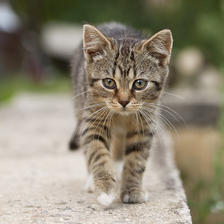
Output: HQ-Resized to 224×224 |
CV-CUDA Operators Used
Operator |
Purpose |
|---|---|
High-quality resize with separate min/mag interpolation filters and optional antialiasing |
Common Utilities Used
read_image() - Load image as CV-CUDA tensor
write_image() - Save the resized image
See Also
Resize Operator - Standard (lower-overhead) resize operator
Common Utilities - Helper functions