Copy Make Border
Overview
The Copy Make Border sample demonstrates how to pad an image with a border of configurable
width and fill style using CV-CUDA’s GPU-accelerated copymakeborder operator. The
operator supports multiple border modes (CONSTANT, REPLICATE, REFLECT,
REFLECT101, WRAP) and operates directly on device tensors, making it well-suited
for preprocessing pipelines that need to pad images before inference.
Usage
Basic Usage
Add an orange border to the default cat image:
python3 copymakeborder.py
Custom Output Path
Specify a custom output file:
python3 copymakeborder.py -i input.jpg -o cat_copymakeborder.jpg
Command-Line Arguments
Argument |
Short Form |
Default |
Description |
|---|---|---|---|
|
|
tabby_tiger_cat.jpg |
Input image file path |
|
|
cvcuda/.cache/cat_copymakeborder.jpg |
Output image file path |
Implementation
Adding a Colored Border
# Add a visible border around the image using CONSTANT mode so the border
# is filled with a solid color rather than replicated/reflected pixels.
# The border widths (top=30, bottom=30, left=60, right=60) make the
# added region clearly visible in the output.
output_image: cvcuda.Tensor = cvcuda.copymakeborder(
    src=input_image,
    top=30,
    bottom=30,
    left=60,
    right=60,
    border_mode=cvcuda.Border.CONSTANT,
    # Bright orange border (R=255, G=140, B=0) makes the padding conspicuous.
    border_value=[255, 140, 0],
)
write_image(output_image, args.output)
Key points:
Border mode:
cvcuda.Border.CONSTANTfills the added region with a fixed color; other modes (REPLICATE,REFLECT,REFLECT101,WRAP) derive fill values from existing image pixels instead.Border value: A three-element list
[R, G, B]supplies the fill color forCONSTANTmode; it is silently ignored for the other modes.Output shape: The output tensor is automatically sized to
(H + top + bottom, W + left + right, C); no pre-allocation is required.Asymmetric padding:
top,bottom,left, andrightare independent integers, enabling padding that differs on each side — useful for letterboxing.
Expected Output
The output shows the original image surrounded by a 30-pixel vertical and 60-pixel horizontal orange border:

Original Input Image |
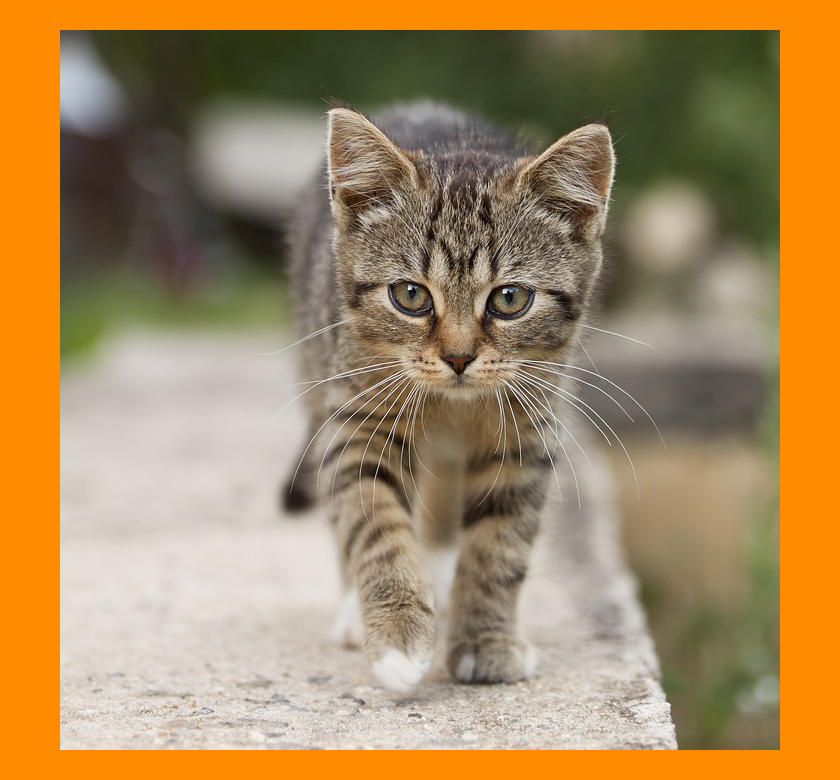
Output: Image with orange border padding |
CV-CUDA Operators Used
Operator |
Purpose |
|---|---|
Pad an image with a configurable border width and fill mode |
Common Utilities Used
read_image() - Load image as CV-CUDA tensor
write_image() - Save bordered image
See Also
Resize Operator - Resize images to target dimensions
Common Utilities - Helper functions used across samples