Warp Affine
Overview
The Warp Affine sample demonstrates GPU-accelerated affine image transformation using CV-CUDA’s
warp_affine operator. The sample builds a 2×3 float32 transformation matrix that rotates the
image 15 degrees counter-clockwise about its centre and shifts it slightly to the right, then
applies it with bilinear interpolation and constant-value border filling.
Usage
Basic Usage
Apply the default rotation+translation warp to an image:
python3 warp_affine.py -i input.jpg
Custom Output Path
Write the warped result to a specific location:
python3 warp_affine.py -i input.jpg -o warped.jpg
Command-Line Arguments
Argument |
Short Form |
Default |
Description |
|---|---|---|---|
|
|
tabby_tiger_cat.jpg |
Input image file path |
|
|
cvcuda/.cache/cat_warp_affine.jpg |
Output image file path |
Implementation
Affine Matrix Setup
# Build a 2x3 float32 affine matrix that rotates the image 15 degrees
# counter-clockwise about the image centre and shifts it slightly right.
# OpenCV convention: the matrix maps *destination* pixel coordinates to
# *source* pixel coordinates (inverse warp), so we use a rotation of -angle.
h, w = input_image.shape[0], input_image.shape[1]
angle_deg = 15.0
angle_rad = math.radians(angle_deg)
cos_a = math.cos(angle_rad)
sin_a = math.sin(angle_rad)
cx, cy = w / 2.0, h / 2.0
# Rotation about the image centre + a small horizontal translation
tx = 20.0  # pixels to shift right
xform = np.array(
    [
        [cos_a, sin_a, (1 - cos_a) * cx - sin_a * cy + tx],
        [-sin_a, cos_a, sin_a * cx + (1 - cos_a) * cy],
    ],
    dtype=np.float32,
)
Warp Affine Call
# Build a 2x3 float32 affine matrix that rotates the image 15 degrees
# counter-clockwise about the image centre and shifts it slightly right.
# OpenCV convention: the matrix maps *destination* pixel coordinates to
# *source* pixel coordinates (inverse warp), so we use a rotation of -angle.
h, w = input_image.shape[0], input_image.shape[1]
angle_deg = 15.0
angle_rad = math.radians(angle_deg)
cos_a = math.cos(angle_rad)
sin_a = math.sin(angle_rad)
cx, cy = w / 2.0, h / 2.0
# Rotation about the image centre + a small horizontal translation
tx = 20.0  # pixels to shift right
xform = np.array(
    [
        [cos_a, sin_a, (1 - cos_a) * cx - sin_a * cy + tx],
        [-sin_a, cos_a, sin_a * cx + (1 - cos_a) * cy],
    ],
    dtype=np.float32,
)
Key points:
2×3 Matrix:
xformis anp.float32array of shape(2, 3)that encodes the full affine map (rotation, scale, shear, translation) in one compact structure.Centre-relative rotation: Translating to the image centre before rotating avoids the image drifting off-canvas; the standard formula embeds the centre correction directly in the translation column of the matrix.
Interpolation flag:
cvcuda.Interp.LINEARgives smooth bilinear interpolation;NEARESTis faster but produces aliasing artefacts on smooth gradients.Border handling:
cvcuda.Border.CONSTANTwithborder_value=[0]fills any pixels that map outside the source image with black — useful for preserving the original framing.
Expected Output
The output shows the image rotated 15 degrees counter-clockwise with a small rightward translation:

Original Input Image |
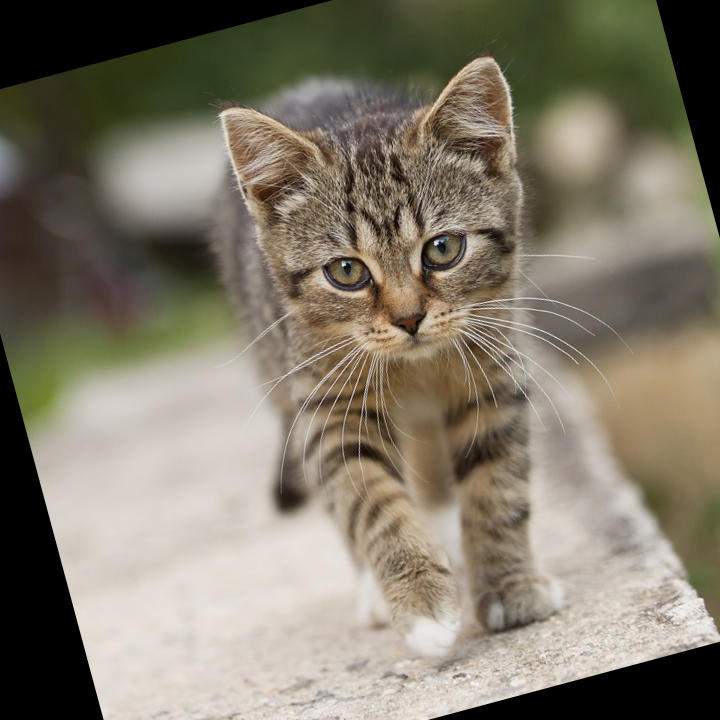
Output: Rotated 15° and shifted right |
CV-CUDA Operators Used
Operator |
Purpose |
|---|---|
Apply a 2×3 affine transformation matrix to an image with configurable interpolation and border handling |
Common Utilities Used
read_image() - Load image as CV-CUDA tensor
write_image() - Save warped image
See Also
Resize Operator - GPU-accelerated image resize
Common Utilities - Helper functions