Crop Flip Normalize Reformat
Overview
The Crop Flip Normalize Reformat sample demonstrates how to combine four common image
preprocessing steps — spatial cropping, horizontal or vertical flipping, per-channel
normalization, and layout reformatting (HWC → NCHW) — into a single GPU kernel call
using CV-CUDA’s crop_flip_normalize_reformat operator. This fused pipeline is
typical in deep-learning inference pipelines where images must be cropped to a region
of interest, augmented with a flip, and then normalized and reformatted before being
fed to a model.
Usage
Basic Usage
Run the pipeline on the default tabby-cat image:
python3 crop_flip_normalize_reformat.py -i input.jpg
Custom Input / Output
Specify your own input image and save the result to a custom path:
python3 crop_flip_normalize_reformat.py -i image.jpg -o cat_crop_flip_normalize_reformat.jpg
Command-Line Arguments
Argument |
Short Form |
Default |
Description |
|---|---|---|---|
|
|
tabby_tiger_cat.jpg |
Input image file path |
|
|
cvcuda/.cache/cat_crop_flip_normalize_reformat.jpg |
Output image file path |
Implementation
Crop, Flip, Normalize, and Reformat
# crop_flip_normalize_reformat operates on an ImageBatchVarShape, so
# wrap the single HWC tensor into a one-image batch.
height, width, channels = input_image.shape
cvcuda_image = cvcuda.as_image(input_image.cuda(), cvcuda.Format.RGB8)
batch = cvcuda.ImageBatchVarShape(1)
batch.pushback([cvcuda_image])

# Define a crop rectangle [crop_x, crop_y, crop_width, crop_height] per image.
# We crop the central 80% of the image so the result still looks good.
crop_x = int(width * 0.1)
crop_y = int(height * 0.1)
crop_w = int(width * 0.8)
crop_h = int(height * 0.8)
crop_data = np.array([[[[crop_x, crop_y, crop_w, crop_h]]]], dtype=np.int32)
crop_rect_host = np.ascontiguousarray(crop_data)

# Allocate crop rect tensor on GPU (shape: [N, 1, 1, 4], layout NHWC)
crop_tensor = cvcuda.Tensor((1, 1, 1, 4), np.int32, "NHWC")
upload_tensor(crop_rect_host, crop_tensor)

# flip_code per image: 1 = flip around y-axis (horizontal flip)
flip_data = np.array([[1]], dtype=np.int32)
flip_host = np.ascontiguousarray(flip_data)
flip_tensor = cvcuda.Tensor((1, 1), np.int32, "NC")
upload_tensor(flip_host, flip_tensor)

# Normalization parameters: base (mean) and scale (std-dev) per channel.
# Using ImageNet-style mean and std for demonstration.
base_data = np.array([[[[0.485, 0.456, 0.406]]]], dtype=np.float32)
scale_data = np.array([[[[0.229, 0.224, 0.225]]]], dtype=np.float32)
base_host = np.ascontiguousarray(base_data)
scale_host = np.ascontiguousarray(scale_data)

base_tensor = cvcuda.Tensor((1, 1, 1, 3), np.float32, "NHWC")
scale_tensor = cvcuda.Tensor((1, 1, 1, 3), np.float32, "NHWC")
upload_tensor(base_host, base_tensor)
upload_tensor(scale_host, scale_tensor)

# The output will be in NCHW layout (planar), float32, at the cropped size.
out_shape = (1, channels, crop_h, crop_w)
Key points:
Fused kernel: All four operations (crop, flip, normalize, reformat) run in a single GPU kernel, avoiding intermediate allocations and memory-bandwidth overhead.
ImageBatchVarShape input: The operator requires images wrapped in a
cvcuda.ImageBatchVarShape, which supports batches of varying-size images.Crop rectangle tensor: The
recttensor has shape[N, 1, 1, 4]with[crop_x, crop_y, crop_width, crop_height]stored per image in the last dimension.SCALE_IS_STDDEV flag: When
cvcuda.NormalizeFlags.SCALE_IS_STDDEVis set thescaleargument is interpreted as per-channel standard deviation, matching the common(pixel/255 - mean) / stdconvention used by PyTorch models.NCHW output layout: Passing
out_layout="NCHW"reformats the data from the interleaved HWC format that the camera/decoder produces into the planar CHW format expected by most deep-learning frameworks — no separatereformatcall is required.
Expected Output
The output shows the central 80% of the image, flipped horizontally, with pixel values de-normalized back to uint8 for display:

Original Input Image |
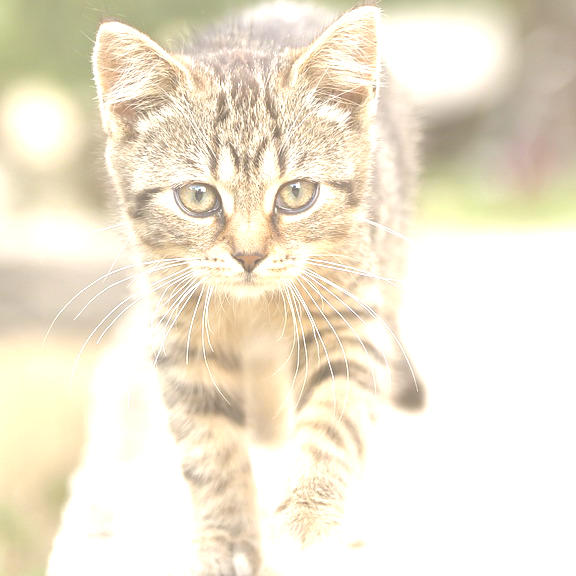
Output: Cropped, Flipped, Normalized (visualized as uint8) |
CV-CUDA Operators Used
Operator |
Purpose |
|---|---|
Crop a region of interest, optionally flip, normalize per channel, and reformat the layout in a single fused GPU kernel |
Common Utilities Used
read_image() - Load image as CV-CUDA tensor
write_image() - Save the result image
cuda_memcpy_h2d- Upload crop-rect, flip-code, and normalization parameter arrays to GPUcuda_memcpy_d2h- Download the float32 result to CPU for inverse-normalization
See Also
Resize Operator - Simple spatial resize
Normalize Operator - Standalone per-channel normalization
Common Utilities - Helper functions