Gamma Contrast
Overview
The Gamma Contrast sample demonstrates how to apply per-image gamma correction using CV-CUDA’s
GPU-accelerated gamma_contrast operator. Gamma correction maps each normalised pixel value
p to p^gamma, which is widely used to match display transfer functions (e.g. the sRGB
standard uses gamma ≈ 2.2) or to adjust the perceptual brightness of an image.
Usage
Basic Usage
Apply standard sRGB gamma correction (gamma = 2.2) to an image:
python3 gamma_contrast.py -i input.jpg
Custom Output Path
Specify a custom output file:
python3 gamma_contrast.py -i input.jpg -o my_gamma_output.jpg
Command-Line Arguments
Argument |
Short Form |
Default |
Description |
|---|---|---|---|
|
|
tabby_tiger_cat.jpg |
Input image file path |
|
|
cvcuda/.cache/cat_gamma_contrast.jpg |
Output image file path |
Implementation
Gamma Contrast Correction
# This sample uses the ImageBatchVarShape overload (gamma_contrast also accepts a
# plain Tensor with a gamma tensor or a host-scalar gamma/gain).
# Wrap the single HWC tensor as a cvcuda.Image and push it into a batch.
img_cvcuda: cvcuda.Image = cvcuda.as_image(input_image.cuda())
batch = cvcuda.ImageBatchVarShape(1)
batch.pushback(img_cvcuda)

# Build a 1-D float32 gamma tensor, one value per image in the batch.
# A gamma of 2.2 matches the standard sRGB display transfer function —
# values < 1 brighten the image, values > 1 darken/increase contrast.
gamma_np = np.array([2.2], dtype=np.float32)
gamma_tensor = cvcuda.Tensor((1,), dtype=np.float32, layout="N")
cuda_memcpy_h2d(gamma_np, gamma_tensor.cuda())
Key points:
ImageBatchVarShape input: This sample demonstrates the var-shape overload, where a single-image tensor is wrapped with
cvcuda.as_imageand pushed into acvcuda.ImageBatchVarShape.gamma_contrastalso accepts plaincvcuda.Tensorinput/output, with either a per-sample gamma tensor or a host-scalargamma/gain. The host-scalar overload acceptsround=cvcuda.Round.NEAREST(the default) orround=cvcuda.Round.TRUNCATEfor integer outputs.Per-image gamma: The gamma argument is a 1-D
float32tensor with one value per image in the batch, enabling different corrections per image in the same call.Standard gamma 2.2: A value of 2.2 matches the sRGB display transfer function, darkening mid-tones to compensate for how monitors render brightness non-linearly.
In-place output extraction: The output
ImageBatchVarShapecontainscvcuda.Imageobjects;cvcuda.as_tensorconverts the first image back to a writable HWC tensor with no data copy.uint8 passthrough: Because the input is already uint8 RGB8, the operator preserves that dtype and the result can be written directly with
write_image.
Expected Output
The output shows the image with gamma-corrected pixel intensities:

Original Input Image |
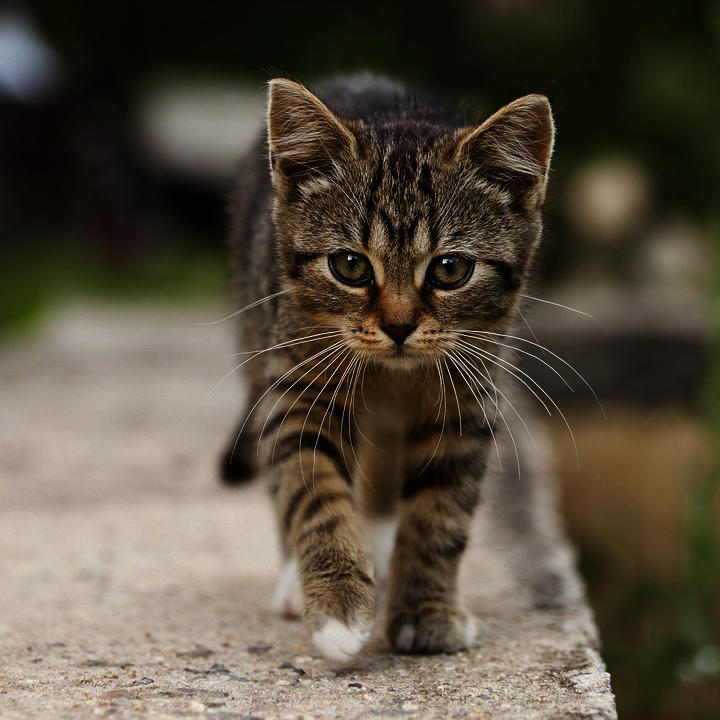
Output: Gamma-corrected (gamma = 2.2) |
CV-CUDA Operators Used
Operator |
Purpose |
|---|---|
Apply per-image power-law (gamma) contrast correction to an image batch |
Common Utilities Used
read_image() - Load image as CV-CUDA tensor
write_image() - Save gamma-corrected image
cuda_memcpy_h2d- Upload the per-image gamma values to the GPU
See Also
Resize Operator - Basic GPU image resizing
Common Utilities - Helper functions