Box Blur
Overview
The Box Blur sample demonstrates selective region blurring using CV-CUDA’s GPU-accelerated
box blur operator. Rather than blurring the entire image, the operator accepts a list of
BlurBoxI rectangles per image in the batch and applies a mean (box) filter only inside
those regions. Pixels outside the declared boxes are copied through unchanged, making the
operator ideal for privacy redaction, watermark concealment, and artistic effects.
Usage
Basic Usage
Blur three rectangular regions of the default input image:
python3 boxblur.py -i input.jpg
Custom Input and Output
Specify input and output paths explicitly:
python3 boxblur.py -i image.jpg -o cat_boxblur.jpg
Command-Line Arguments
Argument |
Short Form |
Default |
Description |
|---|---|---|---|
|
|
tabby_tiger_cat.jpg |
Input image file path |
|
|
cvcuda/.cache/cat_boxblur.jpg |
Output image file path |
Implementation
Box Blur on Selected Regions
# boxblur operates on NHWC batches, so wrap the HWC image in a batch dimension.
# cvcuda.stack adds a leading N=1 dimension and returns an NHWC tensor.
nhwc_image: cvcuda.Tensor = cvcuda.stack([input_image])
h, w = nhwc_image.shape[1], nhwc_image.shape[2]

# Each BlurBoxI specifies (x, y, width, height) in pixel coordinates and the
# square box-filter kernel size.  Larger kernelSize → stronger blur effect.
# Three overlapping boxes of increasing size cover distinct regions of the cat.
bboxes = cvcuda.BlurBoxesI(
    boxes=[
        [
            # Upper-left patch — moderate blur
            cvcuda.BlurBoxI(box=(w // 8, h // 8, w // 5, h // 5), kernelSize=21),
            # Centre of the image — strong blur (e.g. face anonymisation)
            cvcuda.BlurBoxI(box=(w // 4, h // 4, w // 2, h // 2), kernelSize=45),
            # Lower-right corner — light blur
            cvcuda.BlurBoxI(
                box=(w * 3 // 4, h * 3 // 4, w // 6, h // 6), kernelSize=11
            ),
        ]
    ]
)
Key points:
Batch dimension required:
cvcuda.boxblurexpects NHWC input; usecvcuda.stack([hwc_image])to add a leading batch dimension before calling the operator.BlurBoxesI structure: One inner list of
BlurBoxIobjects per image in the batch; each box is(x, y, width, height)in pixel coordinates plus akernelSizefor the square mean filter.Selective blurring: Only the pixels inside each declared rectangle are filtered; all other pixels are passed through untouched.
Kernel size trade-off: Larger
kernelSizeproduces stronger, more noticeable blur at the cost of slightly more compute; the kernel must be odd and at least 1.Layout restoration: After blurring,
reshape(shape[1:], "HWC")strips the batch dimension so the result can be saved directly withwrite_image.
Expected Output
The output image is identical to the input except for three blurred rectangles: a moderate patch in the upper-left, a strong central blur, and a light blur in the lower-right corner.

Original Input Image |
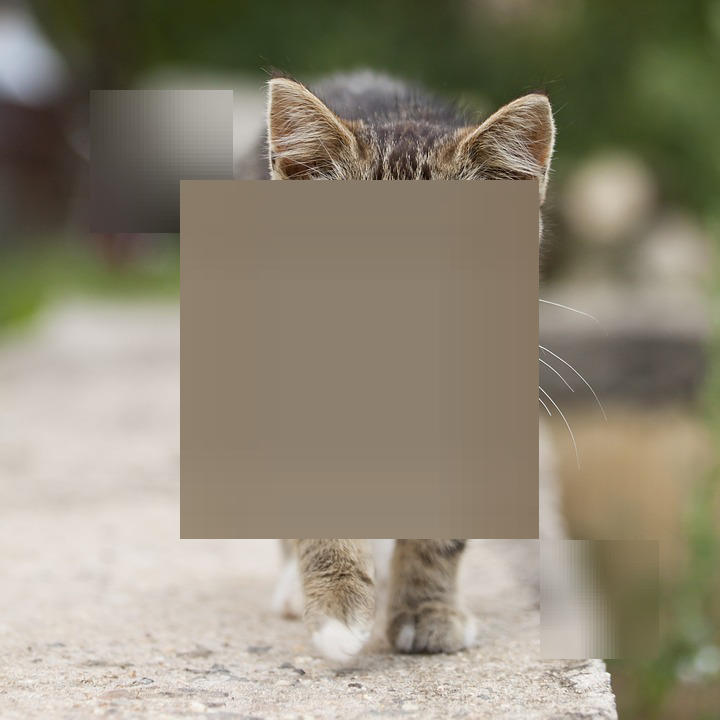
Output: Selective Box Blur Applied |
CV-CUDA Operators Used
Operator |
Purpose |
|---|---|
Apply a mean (box) filter to user-defined rectangular regions within an image |
Common Utilities Used
read_image() - Load image as CV-CUDA tensor
write_image() - Save the blurred result image
parse_image_args() - Parse
--input/--outputCLI arguments
See Also
Resize Operator - GPU-accelerated image resize
Common Utilities - Helper functions used across samples