Remap
Overview
The Remap sample demonstrates GPU-accelerated pixel remapping using CV-CUDA’s remap operator.
A coordinate map is built on the CPU with NumPy — a sinusoidal wave-distortion field — then
uploaded to the GPU and applied to the source image. The result is a ripple-distorted version of
the input that is saved as a viewable JPEG.
Usage
Basic Usage
Apply the default wave distortion to the built-in test image:
python3 remap.py
Custom Input
Remap a custom source image and write to a custom output path:
python3 remap.py -i input.jpg -o cat_remap.jpg
Command-Line Arguments
Argument |
Short Form |
Default |
Description |
|---|---|---|---|
|
|
tabby_tiger_cat.jpg |
Input image file path |
|
|
cvcuda/.cache/cat_remap.jpg |
Output image file path |
Implementation
Building the Displacement Map
# Build a sinusoidal wave-distortion map in absolute coordinates.
# The map tensor must have shape (H, W, 1) with dtype _2F32 (two float32
# values packed per element: [src_x, src_y]) or shape (H, W, 2) with dtype F32.
# We use shape (H, W, 2) / dtype F32 here so each pixel stores [src_x, src_y].
height, width, _ = input_image.shape

# Create grid of output pixel coordinates
ys = np.arange(height, dtype=np.float32)
xs = np.arange(width, dtype=np.float32)
grid_x, grid_y = np.meshgrid(xs, ys)  # both (H, W)

# Apply a sinusoidal horizontal and vertical wave displacement
amplitude = height * 0.04  # ~4 % of image height
freq_x = 2.0 * np.pi / width * 3  # 3 cycles across width
freq_y = 2.0 * np.pi / height * 3  # 3 cycles across height

# Each output pixel at (y, x) samples the source at a displaced position,
# creating a ripple effect that is visually distinctive without clipping content.
src_x = grid_x + amplitude * np.sin(freq_y * grid_y)
src_y = grid_y + amplitude * np.sin(freq_x * grid_x)

# Stack into (H, W, 2) array — channel 0 = src_x, channel 1 = src_y
map_np = np.stack([src_x, src_y], axis=2).astype(np.float32)
map_np = np.ascontiguousarray(map_np)

# Allocate a GPU tensor for the map and upload it from the host.
# Layout "HWC" matches the (H, W, 2) shape; the operator sees 2 channels of F32.
map_tensor = cvcuda.Tensor(map_np.shape, cvcuda.Type.F32, "HWC")
upload_tensor(map_np, map_tensor)
Applying the Remap Operator
# Build a sinusoidal wave-distortion map in absolute coordinates.
# The map tensor must have shape (H, W, 1) with dtype _2F32 (two float32
# values packed per element: [src_x, src_y]) or shape (H, W, 2) with dtype F32.
# We use shape (H, W, 2) / dtype F32 here so each pixel stores [src_x, src_y].
height, width, _ = input_image.shape

# Create grid of output pixel coordinates
ys = np.arange(height, dtype=np.float32)
xs = np.arange(width, dtype=np.float32)
grid_x, grid_y = np.meshgrid(xs, ys)  # both (H, W)

# Apply a sinusoidal horizontal and vertical wave displacement
amplitude = height * 0.04  # ~4 % of image height
freq_x = 2.0 * np.pi / width * 3  # 3 cycles across width
freq_y = 2.0 * np.pi / height * 3  # 3 cycles across height

# Each output pixel at (y, x) samples the source at a displaced position,
# creating a ripple effect that is visually distinctive without clipping content.
src_x = grid_x + amplitude * np.sin(freq_y * grid_y)
src_y = grid_y + amplitude * np.sin(freq_x * grid_x)

# Stack into (H, W, 2) array — channel 0 = src_x, channel 1 = src_y
map_np = np.stack([src_x, src_y], axis=2).astype(np.float32)
map_np = np.ascontiguousarray(map_np)

# Allocate a GPU tensor for the map and upload it from the host.
# Layout "HWC" matches the (H, W, 2) shape; the operator sees 2 channels of F32.
map_tensor = cvcuda.Tensor(map_np.shape, cvcuda.Type.F32, "HWC")
upload_tensor(map_np, map_tensor)
Key points:
Map tensor shape: The coordinate map uses shape
(H, W, 2)with dtypeF32— two float channels storing[src_x, src_y]absolute source coordinates per output pixel.Map type — ABSOLUTE:
cvcuda.Remap.ABSOLUTEmeans each map value is an un-normalized(x, y)pixel coordinate in the source image, giving full control over the displacement.Source interpolation:
src_interp=LINEARsmooths the sampled source values for a continuous displacement field;NEARESTis faster when sub-pixel accuracy is not needed.Border policy:
border=REPLICATEavoids black edges at the image boundary by repeating the nearest border pixel, keeping the output perceptually clean.Host-to-device upload: The NumPy map array is transferred to a pre-allocated
cvcuda.Tensorviacuda_memcpy_h2d— the same pattern used by other samples that synthesize GPU inputs.
Expected Output
The output shows the image with a sinusoidal wave distortion applied:

Original Input Image |
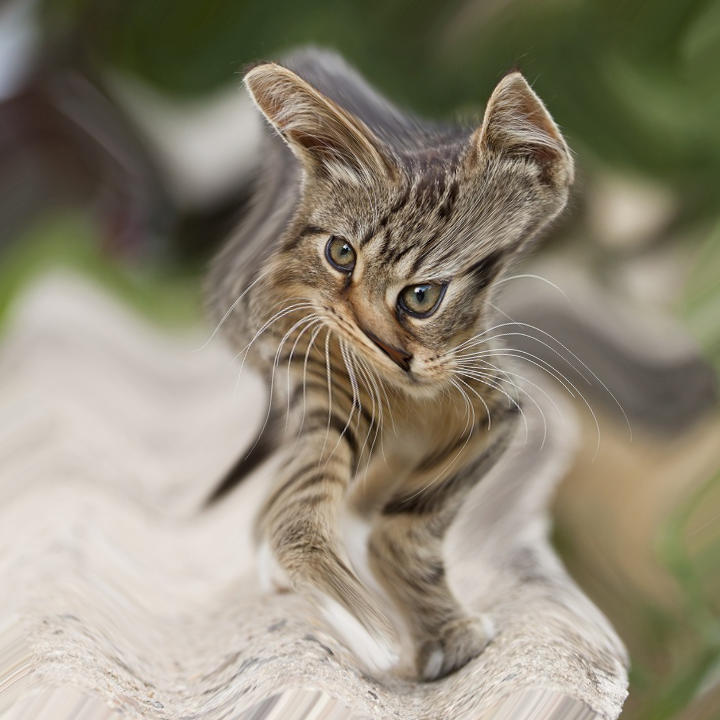
Output: Wave-Distorted Image |
CV-CUDA Operators Used
Operator |
Purpose |
|---|---|
Warp an image using an arbitrary (H, W, 2) coordinate map |
Common Utilities Used
read_image() - Load image as CV-CUDA tensor
write_image() - Save remapped image
cuda_memcpy_h2d- Upload the NumPy coordinate map to the GPU tensor
See Also
Resize Operator - Simple spatial scaling
Common Utilities - Helper functions