Rotate
Overview
The Rotate sample demonstrates GPU-accelerated image rotation using CV-CUDA’s rotate operator. It reads an input image, computes a centring shift so the rotated content stays visible, and writes the result as a standard uint8 JPEG.
Usage
Basic Usage
Rotate the default tabby-cat image by 45 degrees:
python3 rotate.py
Custom Input
Rotate a specific image and save to a custom output path:
python3 rotate.py -i input.jpg -o cat_rotate.jpg
Command-Line Arguments
Argument |
Short Form |
Default |
Description |
|---|---|---|---|
|
|
tabby_tiger_cat.jpg |
Input image file path |
|
|
cvcuda/.cache/cat_rotate.jpg |
Output image file path |
Implementation
Centred Rotation
# cvcuda.rotate performs the inverse mapping:
#   src = R(angle) * (dst - shift)
# where R is a counter-clockwise rotation matrix (screen coords, y-down).
# To keep the image centre fixed we solve for the shift such that
# dst=(cx,cy) maps back to src=(cx,cy), giving:
#   shift = (cx*(1-cos) - cy*sin,  cy*(1-cos) + cx*sin)
h, w = input_image.shape[0], input_image.shape[1]
angle_deg = 45.0
angle_rad = math.radians(angle_deg)
cos_a = math.cos(angle_rad)
sin_a = math.sin(angle_rad)
cx, cy = w / 2.0, h / 2.0
shift_x = cx * (1 - cos_a) - cy * sin_a
shift_y = cy * (1 - cos_a) + cx * sin_a
Key points:
Rotation origin:
cvcuda.rotaterotates around the top-left corner, so a compensating translation shift must be provided to keep the image content centred.Centring shift: The shift
(cx - cx*cos - cy*sin, cy - cy*cos + cx*sin)is derived from the standard 2-D rotation-about-centre formula.Interpolation:
cvcuda.Interp.LINEARgives smooth results;NEARESTis faster andCUBICprovides higher quality at the cost of more computation.Output shape and dtype: The output tensor has the same spatial dimensions and data type as the input — no host-side conversion is needed.
Expected Output
The output shows the image rotated 45 degrees with the content kept centred:

Original Input Image |
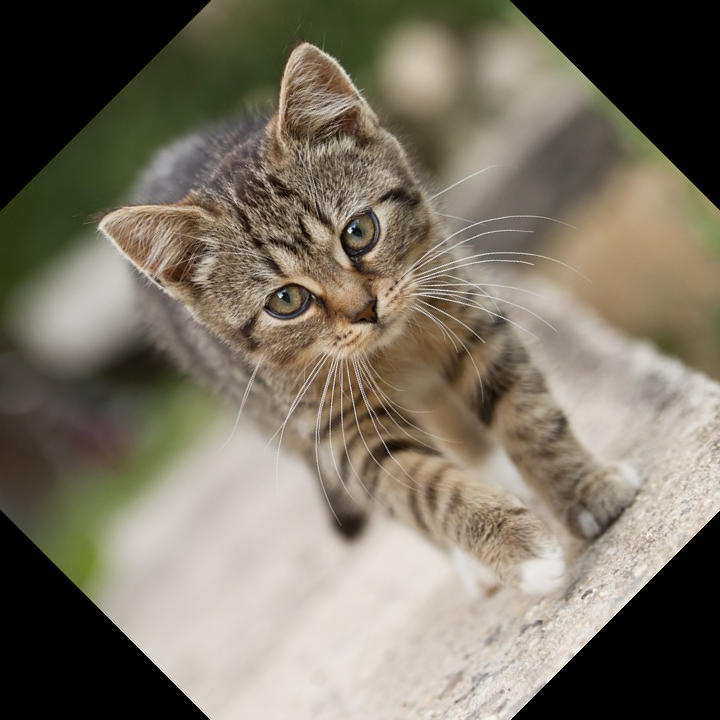
Output: Rotated 45 degrees (centred) |
CV-CUDA Operators Used
Operator |
Purpose |
|---|---|
Rotate an image by an arbitrary angle with configurable interpolation |
Common Utilities Used
read_image() - Load image as CV-CUDA tensor
write_image() - Save rotated image
See Also
Resize Operator - Resize images to target dimensions
Warp Affine Operator - General affine transformations
Common Utilities - Helper functions