Bounding Boxes
Overview
The Bounding Boxes sample demonstrates GPU-accelerated axis-aligned bounding-box
rendering using CV-CUDA’s bndbox operator. Three colored rectangles are drawn
over a cat image, each with an independent border color and thickness.
Usage
Basic Usage
Draw boxes on the default cat image:
python3 bndbox.py
Custom Input
Specify your own image:
python3 bndbox.py -i input.jpg -o cat_bndbox.jpg
Command-Line Arguments
Argument |
Short Form |
Default |
Description |
|---|---|---|---|
|
|
tabby_tiger_cat.jpg |
Input image file path |
|
|
cvcuda/.cache/cat_bndbox.jpg |
Output image file path |
Implementation
Bounding Box Rendering
# bndbox requires a batched NHWC tensor, so wrap the single HWC image in a batch.
# cvcuda.stack promotes [HWC, ...] -> NHWC without copying pixel data.
nhwc_image: cvcuda.Tensor = cvcuda.stack([input_image])

# Describe three axis-aligned boxes to highlight features on the cat image:
#   Red box    – face region (top-centre)
#   Green box  – body torso
#   Blue box   – tail / lower body
# Each BndBoxI takes (x, y, width, height), border thickness, border colour
# (RGB), and fill colour (RGBA).  A fill alpha of 0 leaves the interior
# pixels untouched, so only the border is drawn.
bboxes = cvcuda.BndBoxesI(
    boxes=[
        [
            cvcuda.BndBoxI(
                box=(260, 60, 200, 190),
                thickness=4,
                borderColor=(255, 80, 0),
                fillColor=(255, 80, 0, 0),
            ),
            cvcuda.BndBoxI(
                box=(180, 280, 360, 260),
                thickness=4,
                borderColor=(0, 220, 60),
                fillColor=(0, 220, 60, 0),
            ),
            cvcuda.BndBoxI(
                box=(420, 500, 220, 180),
                thickness=4,
                borderColor=(30, 120, 255),
                fillColor=(30, 120, 255, 0),
            ),
        ],
    ]
)
Key points:
Tensor layout:
cvcuda.bndbox()supportsNHWC/HWCandNCHW/CHWtensors. The sample usesNHWC: usecvcuda.stackto add the batch dimension to a singleHWCimage.BndBoxesI structure: One list of
BndBoxIobjects per batch image; each box specifies(x, y, width, height)in pixel coordinates.Fill alpha 0: Setting the RGBA fill alpha to 0 draws only the border, leaving interior pixels unchanged.
In-place semantics: The operator returns a new tensor but operates on a copy; the source tensor is not modified.
Layout restoration: Reshape the NHWC output back to HWC before passing to
write_image.
Expected Output
The output shows the original cat image with three colored bounding boxes drawn on it:

Original Input Image |
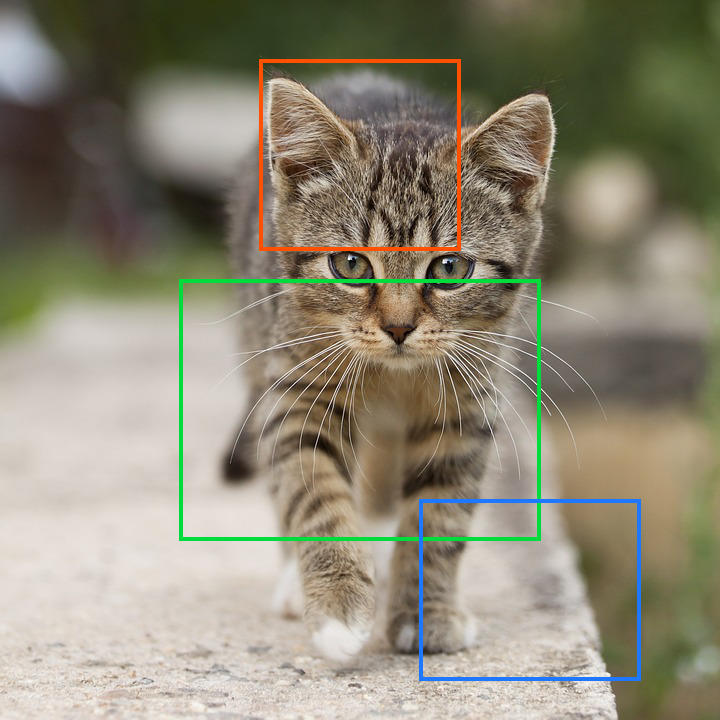
Output: Three colored bounding boxes drawn on the cat |
CV-CUDA Operators Used
Operator |
Purpose |
|---|---|
Draw axis-aligned bounding boxes with configurable border color and thickness |
Common Utilities Used
read_image() - Load image as CV-CUDA tensor
write_image() - Save the annotated output image
See Also
Resize Operator - Scale images before annotation
Common Utilities - Helper functions