Composite
Overview
The Composite sample demonstrates GPU-accelerated image compositing with CV-CUDA. It blends a foreground image (tabby cat) over a background image (Weimaraner dog) using a single-channel alpha mask. A filled circle in the centre of the frame keeps the cat visible while the dog shows through outside the circle, making the blend immediately obvious in the output image.
Usage
Basic Usage
Composite the default cat foreground over the Weimaraner background:
python3 composite.py -i input.jpg
Custom Input
Supply your own foreground image and redirect the output:
python3 composite.py -i image.jpg -o cat_composite.jpg
Command-Line Arguments
Argument |
Short Form |
Default |
Description |
|---|---|---|---|
|
|
tabby_tiger_cat.jpg |
Foreground input image file path |
|
|
cvcuda/.cache/cat_composite.jpg |
Output composited image file path |
Implementation
Composite Operation
h, w, c = fg_image.shape  # HWC layout from read_image

# Resize the background to match the foreground's spatial dimensions so
# cvcuda.composite can pair them element-wise on the GPU.
bg_image: cvcuda.Tensor = cvcuda.resize(bg_raw, (h, w, c))

# Build the foreground mask on the CPU using NumPy, then upload it.
# The mask is single-channel uint8: 255 = keep foreground, 0 = show background.
# A circular region in the centre of the frame exposes the cat; the rest
# shows the Weimaraner, giving a clear visual demonstration of blending.
mask_np = np.zeros((h, w, 1), dtype=np.uint8)
cy, cx = h // 2, w // 2
radius = min(h, w) // 3
# Vectorised distance computation avoids a slow Python loop.
ys, xs = np.ogrid[:h, :w]
inside_circle = (xs - cx) ** 2 + (ys - cy) ** 2 <= radius**2
mask_np[inside_circle, 0] = 255

# Allocate a GPU tensor for the mask and copy the host data across.
# upload_tensor honours the mask tensor's row pitch (a single-channel mask
# is padded to an alignment boundary); a packed copy would shear the mask.
mask_tensor: cvcuda.Tensor = cvcuda.Tensor((h, w, 1), dtype=np.uint8, layout="HWC")
upload_tensor(mask_np, mask_tensor)
Key points:
Mask shape: The foreground mask must be single-channel (
HWCwithC=1), uint8.Spatial alignment: Foreground, background, and mask must share the same
(H, W)dimensions; the background is resized to match the foreground before compositing.outchannels parameter: Pass
3for an RGB output tensor or4for RGBA.Mask semantics: Pixel values
> 0select the foreground;0selects the background — effectively a hard binary blend.GPU upload: The mask is constructed on the CPU with NumPy then transferred to the GPU via
cuda_memcpy_h2dbefore the operator call.
Expected Output
The composited image shows the cat inside a circular region with the Weimaraner dog visible outside it:

Original Input Image (foreground) |
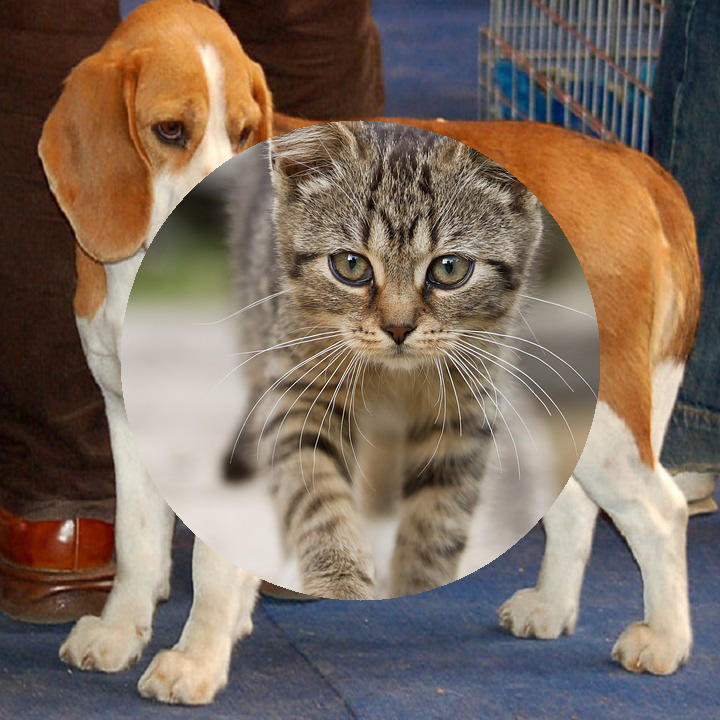
Output: Cat composited over Weimaraner |
CV-CUDA Operators Used
Operator |
Purpose |
|---|---|
Blend foreground and background images using an alpha mask |
|
Resize the background to match foreground spatial dimensions |
Common Utilities Used
read_image() - Load images as CV-CUDA tensors
write_image() - Save the composited image
cuda_memcpy_h2d() - Upload the NumPy mask to the GPU
See Also
Resize Operator - Resize images to target dimensions
Common Utilities - Helper functions used across samples