On-Screen Display
Overview
The On-Screen Display (OSD) sample demonstrates GPU-accelerated compositing of
visual annotations—bounding boxes, text labels, lines, circles, arrows, polygons,
and clock overlays—onto an image using CV-CUDA’s cvcuda.osd() operator.
Usage
Basic Usage
Draw the default set of OSD elements onto the sample cat image:
python3 osd.py -i input.jpg
Custom Input and Output
Specify a custom input image and output path:
python3 osd.py -i input.jpg -o annotated.jpg
Command-Line Arguments
Argument |
Short Form |
Default |
Description |
|---|---|---|---|
|
|
tabby_tiger_cat.jpg |
Input image file path |
|
|
cvcuda/.cache/cat_osd.jpg |
Output image file path with OSD annotations |
Implementation
OSD Element Setup
# The OSD operator requires an NHWC batch tensor and a list-of-lists of
# elements — one inner list per image in the batch.  We promote the single
# HWC image to a batch of 1 (N=1).
h, w, c = input_image.shape
nhwc_image: cvcuda.Tensor = input_image.reshape((1, h, w, c), "NHWC")

# Build a representative set of OSD primitives.  All coordinates are in
# pixels; colours are RGBA tuples.  We scale positions relative to the
# image dimensions so the overlay looks reasonable on any input size.
box_x, box_y = w // 8, h // 8
box_w, box_h = w // 4, h // 4

elements = cvcuda.Elements(
    elements=[
        [
            # Filled bounding box drawn around the top-left region
            cvcuda.BndBoxI(
                box=(box_x, box_y, box_w, box_h),
                thickness=3,
                borderColor=(255, 255, 0),
                fillColor=(0, 128, 255, 64),
            ),
            # Text label placed near the top-left of the image
            cvcuda.Label(
                utf8Text="CV-CUDA OSD",
                fontSize=24,
                tlPos=(box_x, box_y - 30 if box_y >= 30 else box_y + box_h + 5),
                fontColor=(255, 255, 255),
                bgColor=(0, 0, 0, 180),
            ),
            # Diagonal line across the image
            cvcuda.Line(
                pos0=(0, 0),
                pos1=(w - 1, h - 1),
                thickness=2,
                color=(0, 255, 0),
            ),
            # Circle at the image centre
            cvcuda.Circle(
                centerPos=(w // 2, h // 2),
                radius=min(w, h) // 8,
                thickness=2,
                borderColor=(255, 128, 0),
                bgColor=(255, 128, 0, 48),
            ),
            # Arrow pointing inward from the right edge
            cvcuda.Arrow(
                pos0=(w - 1, h // 2),
                pos1=(w * 3 // 4, h // 2),
                arrowSize=12,
                thickness=2,
                color=(255, 0, 128),
            ),
            # Closed polygon (diamond shape) at the image centre
            cvcuda.PolyLine(
                points=np.array(
                    [
                        [w // 2, h // 4],
                        [w * 3 // 4, h // 2],
                        [w // 2, h * 3 // 4],
                        [w // 4, h // 2],
                    ],
                    dtype=np.int32,
                ),
                thickness=2,
                isClosed=True,
                borderColor=(0, 255, 255),
                fillColor=(0, 255, 255, 32),
            ),
            # Timestamp overlay in the bottom-left corner
            cvcuda.Clock(
                clockFormat=cvcuda.ClockFormat.YYMMDD_HHMMSS,
                time=0,
                fontSize=14,
                tlPos=(10, h - 30 if h > 40 else 5),
                fontColor=(255, 255, 0),
                bgColor=(0, 0, 0, 160),
            ),
        ]
    ]
)
OSD Operator Call
# The OSD operator requires an NHWC batch tensor and a list-of-lists of
# elements — one inner list per image in the batch.  We promote the single
# HWC image to a batch of 1 (N=1).
h, w, c = input_image.shape
nhwc_image: cvcuda.Tensor = input_image.reshape((1, h, w, c), "NHWC")

# Build a representative set of OSD primitives.  All coordinates are in
# pixels; colours are RGBA tuples.  We scale positions relative to the
# image dimensions so the overlay looks reasonable on any input size.
box_x, box_y = w // 8, h // 8
box_w, box_h = w // 4, h // 4

elements = cvcuda.Elements(
    elements=[
        [
            # Filled bounding box drawn around the top-left region
            cvcuda.BndBoxI(
                box=(box_x, box_y, box_w, box_h),
                thickness=3,
                borderColor=(255, 255, 0),
                fillColor=(0, 128, 255, 64),
            ),
            # Text label placed near the top-left of the image
            cvcuda.Label(
                utf8Text="CV-CUDA OSD",
                fontSize=24,
                tlPos=(box_x, box_y - 30 if box_y >= 30 else box_y + box_h + 5),
                fontColor=(255, 255, 255),
                bgColor=(0, 0, 0, 180),
            ),
            # Diagonal line across the image
            cvcuda.Line(
                pos0=(0, 0),
                pos1=(w - 1, h - 1),
                thickness=2,
                color=(0, 255, 0),
            ),
            # Circle at the image centre
            cvcuda.Circle(
                centerPos=(w // 2, h // 2),
                radius=min(w, h) // 8,
                thickness=2,
                borderColor=(255, 128, 0),
                bgColor=(255, 128, 0, 48),
            ),
            # Arrow pointing inward from the right edge
            cvcuda.Arrow(
                pos0=(w - 1, h // 2),
                pos1=(w * 3 // 4, h // 2),
                arrowSize=12,
                thickness=2,
                color=(255, 0, 128),
            ),
            # Closed polygon (diamond shape) at the image centre
            cvcuda.PolyLine(
                points=np.array(
                    [
                        [w // 2, h // 4],
                        [w * 3 // 4, h // 2],
                        [w // 2, h * 3 // 4],
                        [w // 4, h // 2],
                    ],
                    dtype=np.int32,
                ),
                thickness=2,
                isClosed=True,
                borderColor=(0, 255, 255),
                fillColor=(0, 255, 255, 32),
            ),
            # Timestamp overlay in the bottom-left corner
            cvcuda.Clock(
                clockFormat=cvcuda.ClockFormat.YYMMDD_HHMMSS,
                time=0,
                fontSize=14,
                tlPos=(10, h - 30 if h > 40 else 5),
                fontColor=(255, 255, 0),
                bgColor=(0, 0, 0, 160),
            ),
        ]
    ]
)
Key points:
Tensor layout:
cvcuda.osd()supportsNHWC/HWCandNCHW/CHWtensors. The sample usesNHWC: a singleHWCimage is reshaped to(1, H, W, C)before the call and squeezed back afterward.Elements list-of-lists:
cvcuda.Elementstakes a list with one inner list per image in the batch. Each inner list may contain any mix of the supported primitive types.In-place compositing: The output tensor shares shape, dtype, and layout with the input; all primitives are alpha-blended onto it in a single GPU pass.
Coordinate scaling: Positions and sizes are computed relative to the image dimensions so the overlay adapts to any input resolution.
Primitive variety: The sample showcases all major OSD primitives—
cvcuda.BndBoxI,cvcuda.Label,cvcuda.Line,cvcuda.Circle,cvcuda.Arrow,cvcuda.PolyLine, andcvcuda.Clock.
Expected Output
The output is the input image with all OSD annotations composited on top:

Original Input Image |
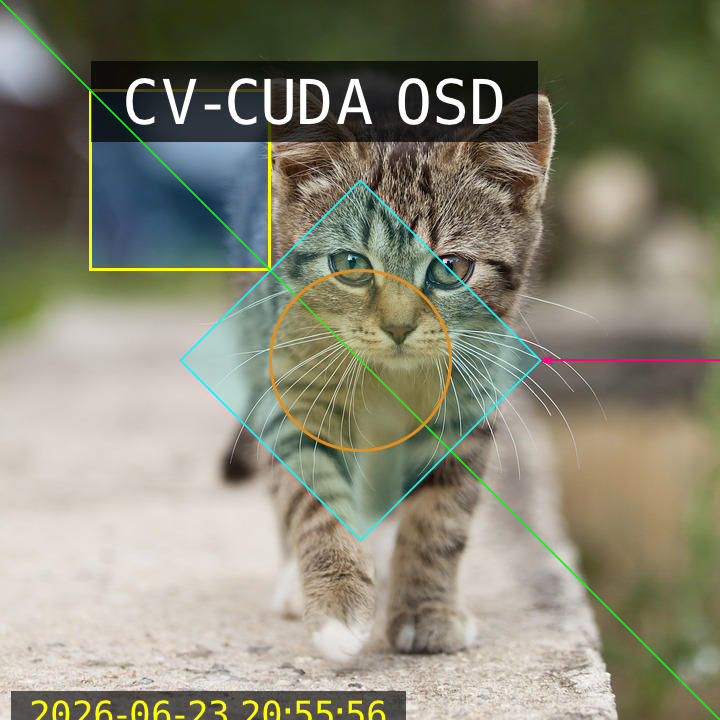
Output: Image with OSD annotations |
CV-CUDA Operators Used
Operator |
Purpose |
|---|---|
Composite bounding boxes, text, lines, shapes, and overlays onto images |
Common Utilities Used
read_image() - Load image as CV-CUDA tensor
write_image() - Save annotated image
See Also
Resize Operator - Resize images before annotation
Common Utilities - Helper functions