Resize Crop Convert Reformat
Overview
The Resize Crop Convert Reformat sample demonstrates a fused preprocessing pipeline using
CV-CUDA’s GPU-accelerated cvcuda.resize_crop_convert_reformat() operator. In a
single kernel the operator:
Resizes the input image to a target dimension using linear or nearest-neighbor interpolation,
Crops a rectangular region of interest from the resized result,
Converts the pixel data type (e.g.
uint8→float32), andReformats the memory layout (e.g.
NHWC→NCHW) and optionally reverses the channel order (BGR ↔ RGB).
This mirrors the standard ImageNet-style pre-processing pipeline that DL inference frameworks apply before feeding images to a convolutional network.
Usage
Basic Usage
Run with the default 224×224 resize / 224×224 crop:
python3 resize_crop_convert_reformat.py -i input.jpg
Custom Dimensions
Specify a different resize and crop target (crop is always the full --width ×
--height window starting at the top-left corner):
python3 resize_crop_convert_reformat.py -i input.jpg -o result.jpg --width 512 --height 512
Command-Line Arguments
Argument |
Short Form |
Default |
Description |
|---|---|---|---|
|
|
tabby_tiger_cat.jpg |
Input image file path |
|
|
cvcuda/.cache/cat_resize_crop_convert_reformat.jpg |
Output image file path |
|
224 |
Target crop width in pixels (also used as resize width) |
|
|
224 |
Target crop height in pixels (also used as resize height) |
Implementation
Fused Pipeline
# Wrap the single HWC image in a batch dimension so we can use the NHWC
# path, which also demonstrates the typical DL pipeline usage pattern.
nhwc_image: cvcuda.Tensor = input_image.reshape(
    (1, *input_image.shape), layout="NHWC"
)

# Target resize and crop dimensions.  We resize to the requested
# height x width (224x224 by default), then crop a region of the same size
# from the top-left corner — a typical pre-processing pipeline.
resize_dim = (args.height, args.width)  # (H, W) after resize
crop_w = min(args.width, resize_dim[1])
crop_h = min(args.height, resize_dim[0])
crop_rect = cvcuda.RectI(0, 0, crop_w, crop_h)
Key points:
Single-kernel fusion: resize, crop, type conversion, layout reformat, and optional channel reversal all happen in one GPU pass, avoiding intermediate allocations and memory bandwidth waste.
``layout=”NCHW”``: the output tensor uses channel-first memory order, which is the format expected by most deep-learning inference runtimes (TensorRT, ONNX Runtime, etc.).
``manip=cvcuda.ChannelManip.REVERSE``: swaps BGR ↔ RGB in the same pass, which is needed when the codec reads BGR and the model was trained on RGB (or vice versa).
``scale`` and ``offset``: optional linear normalisation
output = pixel / scale + offsetapplied after type conversion; setscale=127.5, offset=-1for[-1, 1]normalisation used by many classification and detection models.Host-side reformat for saving: because the image encoder expects HWC uint8, the NCHW float32 result is transposed and clipped on the CPU before writing.
Expected Output
The output shows the input image resized to 224×224, cropped to 224×224, and returned to a viewable HWC uint8 format for saving:

Original Input Image |
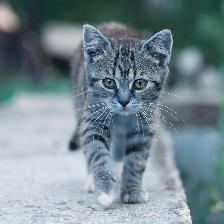
Output: Resized, Cropped, and Reformatted |
CV-CUDA Operators Used
Operator |
Purpose |
|---|---|
Fused resize → crop → type convert → layout reformat in a single GPU kernel |
Common Utilities Used
read_image() - Load image as CV-CUDA tensor
write_image() - Save result image
cuda_memcpy_d2h/cuda_memcpy_h2d- Transfer tensor data between GPU and CPU for host-side reformat
See Also
Resize Operator - Simple image resize
Common Utilities - Helper functions